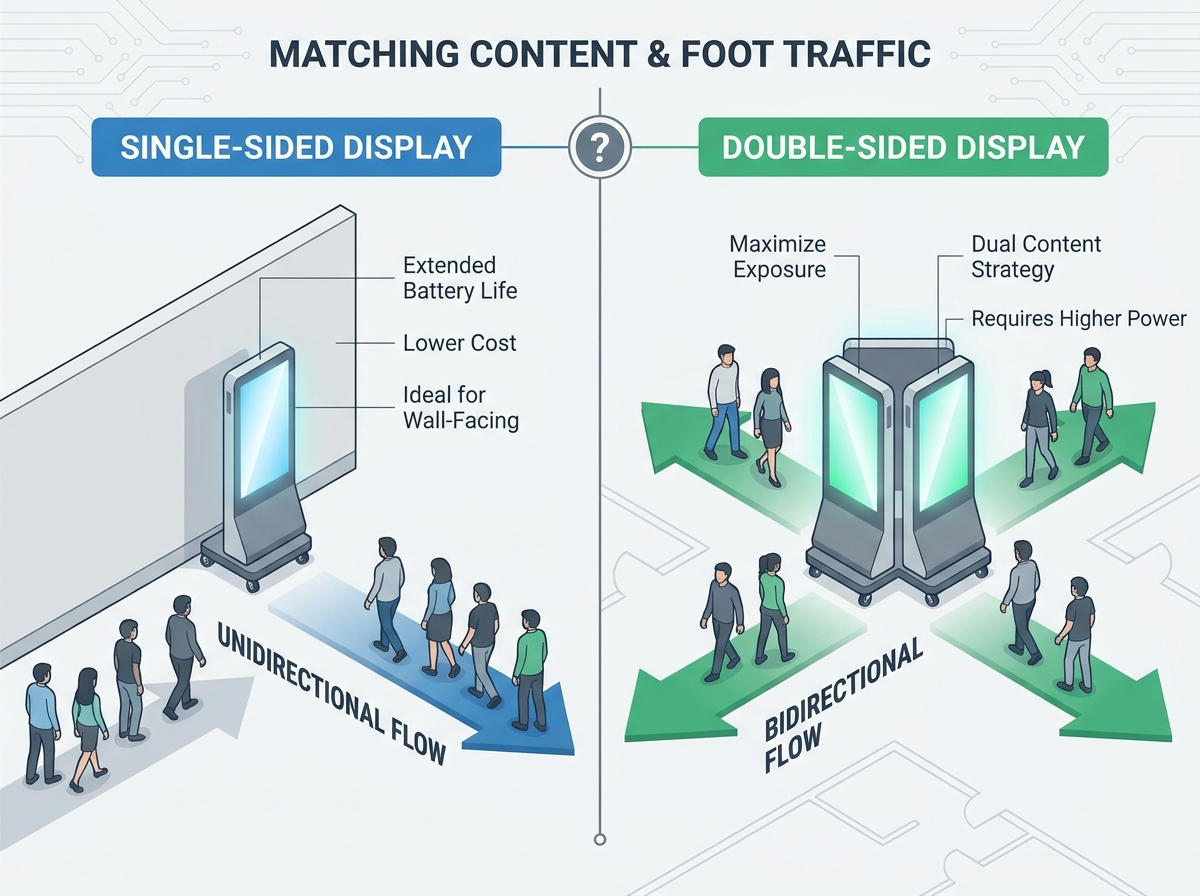
Operations and marketing managers face a common purchasing dilemma today. Investing in portable digital signage requires careful balance. You must weigh upfront hardware costs against actual foot traffic realities in your physical locations. The transition from static A-frames to digital units brings new challenges. Over-speccing hardware wastes your budget and drains battery life unnecessarily. For instance, buying dual-screen models when single-screen variants suffice burns capital. Conversely, under-speccing leaves valuable audience impressions completely on the table. Choosing the right configuration requires objective analysis. The final decision always hinges on three verifiable factors. Directional traffic flow dictates your exposure opportunities. Physical placement constraints limit available hardware dimensions. Finally, your overall content strategy determines the exact screen count you need. Read on to discover how to align your hardware choices with environmental realities.
Key Takeaways
- Foot traffic patterns (unidirectional vs. bidirectional) dictate whether the premium for a second screen is justified.
- Single-sided units offer extended operational time and lower weight, making them ideal for wall-facing or endcap deployments.
- Double-sided units maximize exposure in open-floor plans but require stricter power management and distinct two-screen content strategies.
- Hardware weight, ADA aisle compliance, and battery degradation over time are primary operational risks to evaluate before procurement.
Assessing Foot Traffic and Retail Aisle Sign Placement
Environmental layout strongly dictates your hardware needs. Evaluating the physical floor plan must strictly precede any hardware selection. Jumping straight to procurement often leads to poor deployment strategies. You end up with signs facing empty walls. Traffic flow analysis reveals vital clues about audience movement. Unidirectional flow happens in checkout queues or near escalators. Here, people move steadily in one specific direction. Bidirectional flow occurs in center-store aisles and expansive event concourses. Shoppers approach these displays from multiple opposite angles simultaneously. You need hardware suited to these distinct movement patterns.
Spatial requirements drastically influence optimal retail aisle sign placement. Placing signs flush against store endcaps renders a second screen entirely useless. Wall-adjacent locations similarly hide the back panel from consumer view. Wasting battery power on a screen nobody sees makes little sense. Ambient light levels and viewer distance further impact screen readability. These environmental dynamics directly dictate your rechargeable poster viewing direction choices. Bright overhead lighting might easily wash out poorly angled digital screens. Strategic screen orientation ensures maximum visual clarity for approaching customers. You must meticulously measure aisle widths before finalizing any placement strategies. Proper physical positioning prevents obstruction while maximizing visual impact.
![Double sided battery display implementation in retail environment]()
The Business Case for Single-Sided Displays
Single-panel units present a highly favorable cost-to-outcome ratio for operators. They require significantly lower upfront capital expenditure compared to dual-screen alternatives. Reduced hardware complexity also means lower maintenance and replacement costs later. You save valuable budget for professional content creation or adding additional screens elsewhere. Budget efficiency remains paramount for scaling operations across multiple locations.
Powering just one screen yields incredible operational efficiencies for store staff. Battery life per charge extends significantly under these conditions. You often see runtimes increase by 30 to 40 percent immediately. This extended operational time reduces daily charging burdens on retail staff. Single-screen models also weigh significantly less due to fewer components. Employees can handle, roll, and reposition them safely without heavy mechanical assistance.
Evidence-backed deployment zones highlight exactly where single-sided displays reign supreme. Consider using them against storefront glass facing outward to street traffic. They work brilliantly for directing customer flow at physical dead-ends or tight corners. You should place them inside narrow corridors where back-facing screens remain unseen. They also perform perfectly when mounted near promotional endcaps requiring front-only visibility.
However, you must remain skeptical about utilizing single-sided displays for center-aisle placements. Deploying single-sided units in open walkways creates distinct visual problems. The blank back panel introduces awkward, unappealing visual dead space. It looks highly unprofessional to approaching shoppers walking behind the unit. Blank metal casings disrupt carefully curated retail aesthetic environments. Always restrict single-screen models to boundary-adjacent zones to maintain store design integrity.
Maximizing ROI with a Double Sided Battery Display
Evaluating the premium for dual-screen models requires realistic ROI modeling. Do not frame the benefit merely as doubling your retail revenue. Instead, view it as securing a 100 percent increase in impression opportunities. A robust double sided battery display captures bidirectional traffic flawlessly. It maximizes engagement in zones where shoppers move continuously from multiple directions. You capture attention regardless of where the customer originates.
Open spaces demand specific signage strategies to succeed commercially. Concourses, expansive trade show floors, and broad mall walkways serve as primary use cases. These high-traffic environments practically require dual screen portable advertising to function effectively. Capturing approaching traffic from both directions completely eliminates inherent physical blind spots. Traditional single-sided signage often ignores half the potential audience walking by. Dual screens ensure every single passerby sees your active promotional messaging.
However, you must check your baseline assumptions carefully before investing. Positive return on investment only materializes under specific environmental conditions. Foot traffic volume must actively justify the increased hardware costs. You must also account for accelerated battery drain during daily operations. Low-traffic areas simply do not generate enough visual impressions to offset the initial investment. Map your busiest walkways meticulously before authorizing premium hardware purchases for your fleet.
Two Screen Content Planning: Synchronized vs. Independent Messaging
Creative strategy plays a massive role in portable hardware success. Proper two screen content planning demands distinct technical and creative requirements. You must decide precisely how both panels will interact visually. Neglecting content strategy turns premium hardware into an expensive distraction.
Synchronized content represents the simplest deployment method available to marketers. Mirroring identical visuals on both sides reinforces brand identity quickly and effectively. It works beautifully for simple directional wayfinding inside large convention centers. A large flashing arrow pointing left helps everyone navigate venues smoothly. Synchronized messaging reduces heavy content creation burdens on your internal design team.
Conversely, contextual or independent messaging offers highly advanced targeting capabilities. You can run completely different content based entirely on audience walking direction. For instance, inbound store traffic sees a bold message promoting daily deals. Outbound traffic sees a polite "Thank You" screen featuring loyalty app QR codes. This split-messaging strategy highly personalizes the overall visitor journey. It delivers the right message at the exact right moment.
Evaluators must verify their Content Management System (CMS) capabilities beforehand. Not every software platform supports complex dual-screen logic flawlessly. Your shortlisted CMS must allow independent zone control seamlessly. It needs to run two distinct video files simultaneously from a single battery-powered media player. Always request a live software demonstration proving this specific capability before signing contracts.
Implementation Realities: Battery Drain, Weight, and Compliance
Power management introduces harsh realities to portable signage daily operations. Battery degradation occurs naturally over thousands of continuous charge cycles. Running two high-brightness LCD panels simultaneously draws immense electrical power. Hardware requires robust lithium-ion or LiFePO4 battery technologies to function reliably. You should expect an 8 to 10 hour maximum runtime under peak brightness settings. Displays lose charge faster in bright retail environments requiring maximum screen luminance. Store managers must plan charging schedules meticulously to prevent mid-day blackouts.
Weight and portability strongly influence daily retail workflows and staff safety. Dual-screen models contain heavy protective glass and massive internal battery banks. Moving these large units demands significant physical effort from retail staff members. Heavy-duty locking casters are absolutely mandatory for safe daily relocation. Positioning larger dual-screen units safely might require two staff members working together. Never underestimate the ergonomic strain of moving 150-pound displays across carpeted floors.
Safety and compliance govern public aisle obstruction legally and strictly. You must adhere to the Americans with Disabilities Act (ADA) standards closely. Local municipal compliance codes dictate minimum pedestrian aisle clearance strictly. The wider physical footprint of dual-sided models sometimes violates these critical clearance standards. Managers must measure deployment zones carefully to ensure wheelchair accessibility remains unhindered.
Risk mitigation involves evaluating your charging infrastructure options thoroughly. Consider the ease of utilizing hot-swappable batteries versus standard plug-in charging requirements. Swappable batteries allow continuous 24-hour operation if teams manage them correctly. Plug-in models require overnight charging near dedicated electrical wall outlets. Operations teams must assess which charging method fits their overnight staffing models best.
The Decision Matrix: Shortlisting Your Ideal Configuration
Buyers need a concrete shortlisting logic before requesting formal vendor quotes. Establishing an objective evaluation framework prevents costly procurement errors down the line. Consider the following specific criteria closely when making your final hardware selection.
- Choose Single-Sided if: Your deployment location remains wall-adjacent permanently. Strict budget restrictions heavily limit your initial hardware spending. Store staff requires ultra-lightweight portability for frequent daily movement.
- Choose Double-Sided if: You operate mostly in an expansive open floor plan. Bidirectional pedestrian traffic regularly exceeds 500 people per hour. Your chosen CMS fully supports independent dual-messaging functionality.
Vendor vetting requires asking precise technical questions during sales pitches. Never accept vague "eco mode" battery life claims from sales representatives. Demand guaranteed minimum battery runtimes officially tested at 100 percent screen brightness. Real-world retail environments rarely allow for dim, power-saving screen settings. Bright store lighting demands maximum screen luminance to remain visible.
Hardware Configuration Comparison Chart
| Feature Requirement | Single-Sided Ideal Use Case | Double-Sided Ideal Use Case |
| Foot Traffic Flow | Unidirectional (queues, escalators) | Bidirectional (concourses, wide aisles) |
| Physical Placement | Wall-facing, endcaps, corners | Center-aisle, open mall walkways |
| Power Consumption | Lower (extends operational hours) | Higher (requires frequent charging) |
| Staff Handling | Easy (lightweight, single user) | Moderate (heavier, requires heavy casters) |
Next steps involve disciplined real-world testing procedures before full commitment. We strongly advise requesting a localized pilot program from your vendor. Test one unit of each type inside a high-traffic flagship store location. Gather honest staff feedback regarding daily charging burdens and physical maneuverability. Monitor customer engagement metrics closely before initiating a massive fleet-wide rollout. Small tests prevent massive systemic failures across your retail footprint.
Final Thoughts and Next Steps
Choosing between single and double-sided displays remains a core architectural decision. It represents a strict operational choice rather than just a simple marketing initiative. Environmental realities dictate hardware success far more than raw screen counts ever will. You must assess actual traffic flow accurately to justify premium hardware investments.
Start by auditing your existing physical floor plans thoroughly today. Map the daily pedestrian traffic flows through your primary retail spaces. Observe exactly where shoppers naturally pause and from which directions they usually approach. Consider contacting a professional digital signage consultant to map complex deployment zones effectively. Precise physical planning ensures every digital screen captures maximum audience attention. Proper hardware alignment guarantees your messaging reaches the right people at the right time.
FAQ
Q: Does a double-sided battery display consume exactly twice the power?
A: It consumes significantly more power, but rarely exactly double. Both screens share internal components like the mainboard, media player, and cooling systems. You typically see a 70 to 80 percent increase in overall power draw compared to single-screen units. Actual consumption depends heavily on the specific integrated media player and brightness settings.
Q: Can I run two different videos simultaneously on a dual-screen portable display?
A: This depends entirely on the integrated media player built into the display. The player must feature specific dual-output and independent zoning capabilities. You must verify these software features during the procurement phase. Some entry-level models only support basic screen mirroring.
Q: How heavy are portable dual-screen digital posters?
A: Portable dual-screen digital posters are quite heavy due to internal batteries and dual glass panels. Realistic weight ranges often fall between 100 to over 180 pounds. This substantial weight emphasizes the absolute necessity of high-quality, heavy-duty locking casters for safe staff handling.
Q: Are these displays safe to leave in high-traffic aisles?
A: Yes, provided they meet strict commercial safety standards. You must address potential tip-over risks by ensuring the base is heavily weighted. Public deployments also require tempered, shatter-proof glass to protect pedestrians. Always verify ADA compliance to ensure the units do not unlawfully obstruct walkway clearances.