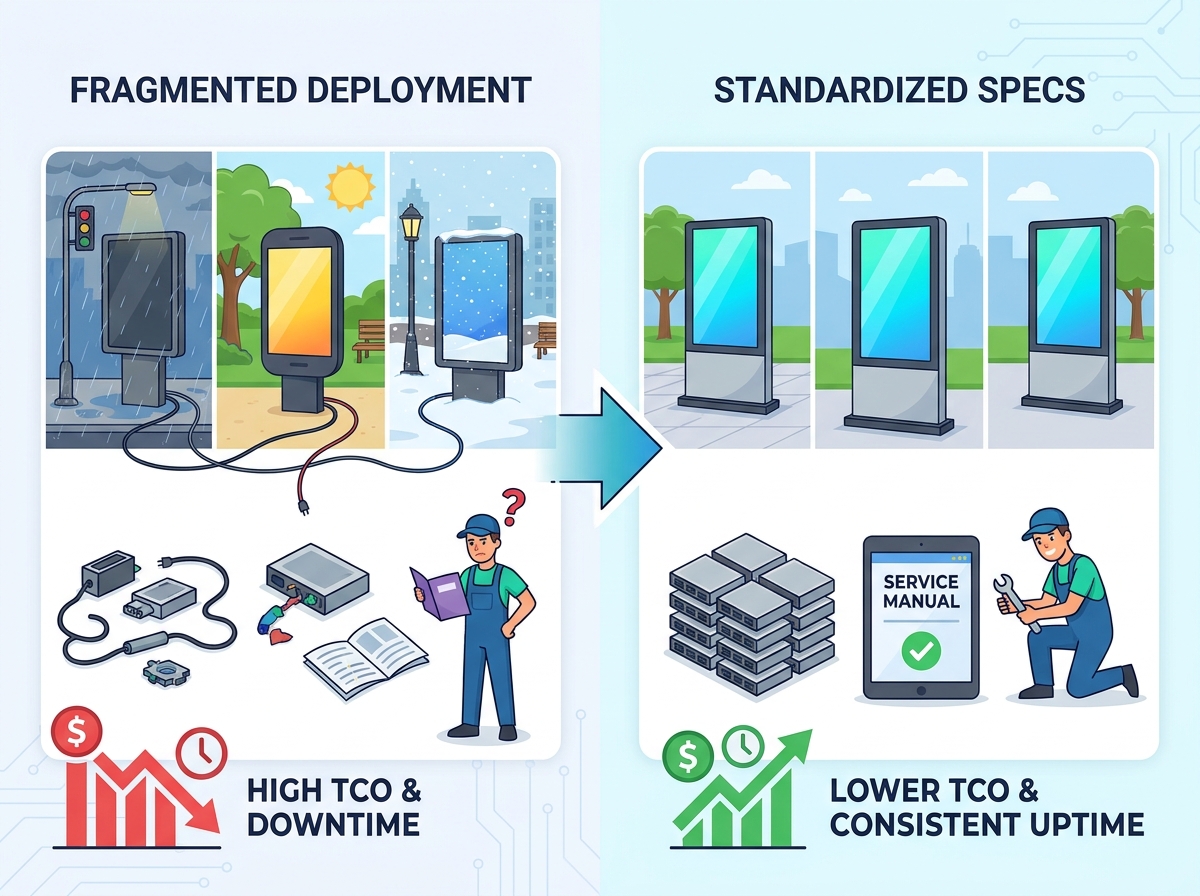
Deploying digital displays across dozens of locations presents a massive challenge. Operations teams face significant logistical hurdles daily. Regional branches often purchase different enclosures autonomously. They select varying media players or display models independently. This decentralized purchasing approach creates a heavily fragmented hardware ecosystem. It inevitably leads to spiraling maintenance costs. IT departments suffer endless troubleshooting headaches. Every unique display demands specific repair steps. Field technicians struggle to resolve issues quickly. You must unify your deployment strategy immediately. A successful multi-site rollout requires strict adherence to a unified hardware specification. You also need comprehensive, standardized service documentation. This powerful combination ensures consistent network uptime. It keeps operational overhead remarkably low. In this comprehensive guide, we will explore practical strategies. You will learn how to standardize your hardware fleet effectively. We will show you how to build foolproof deployment checklists. We will also detail the crucial documentation needed to support your widespread network.
Key Takeaways
- Defining a strict baseline hardware specification prevents regional deployment inconsistencies and vendor lock-in.
- Standardizing service documentation ensures third-party maintenance teams can achieve first-time fix rates, regardless of the deployment site.
- Mandating a comprehensive spare parts inventory model drastically reduces Mean Time To Repair (MTTR) across geographically dispersed networks.
- Site preparation must be standardized via operational checklists to account for local environmental and structural variances before hardware arrives.
The Operational Risks of Fragmented Hardware Deployments
When operations teams lack central oversight, chaos ensues rapidly. A branch in one city might install a premium model. Another branch might opt for a budget-friendly alternative. This inconsistency creates a massive operational burden. An outdoor advertising totem represents a substantial infrastructure investment. You must treat it like essential enterprise hardware. Fragmented deployments inflate your long-term operational burdens severely.
Varying hardware models destroy repair timelines completely. Field technicians cannot carry standardized parts in their service vans. They arrive at a site missing critical components. Return visits become strictly necessary. Screen downtime extends from a few hours to several days. This unacceptable delay hurts brand reputation directly. It also causes immediate losses in advertising revenue.
Content management systems require uniform environments. Deploying software updates across a fragmented fleet is immensely difficult. Managing security patches across mixed operating systems wastes valuable IT time. Here are the primary software friction points you will encounter:
- Operating System fragmentation requires multiple update testing phases.
- Different media players process content resolutions inconsistently.
- Security vulnerability patches fail on unsupported legacy hardware.
You lose network-wide control quickly under these conditions. A standardized deployment provides immediate operational relief. It uses a strictly unified Bill of Materials (BOM). You gain centralized, effortless warranty management. Maintenance schedules become highly predictable. They are easy to enforce across all regions.
Establishing Your Multi Site Display Hardware Specification
Strict baseline requirements ensure reliable commercial-grade deployments. Consumer-grade screens fail outside within months. You need a rigorous multi site display hardware specification. This specification serves as your absolute source of truth.
Environmental Resilience
Your units face harsh weather conditions daily. Specify IK10 impact resistance for ultimate vandal protection. This rating ensures the glass withstands severe blows. Mandate IP65 or IP66 ingress protection ratings immediately. They keep dust and heavy rain out completely. Ensure operational temperature ranges span from -30°C to +50°C. You may need internal heating modules for extremely cold climates.
Thermal Management Systems
Heat destroys internal electronics faster than anything else. Evaluate vendor claims on thermal efficiency very closely. Compare heavy-duty HVAC systems against advanced fan-cooled enclosures. HVAC provides superior cooling capacity. It draws significantly more power and requires refrigerant maintenance. Fan systems cost less initially. They handle extreme desert heat poorly. Choose your cooling mechanism based on rigorous local climate data.
Optical Performance
Direct sunlight demands extreme brightness output. Require a minimum of 2,500 nits. This ensures exceptional daytime readability for pedestrians and drivers. Include automated ambient light sensors. They adjust brightness dynamically throughout the day. This saves immense power during nighttime hours. It also prevents light pollution complaints from local municipalities.
Select totems featuring easily accessible internal parts. Hot-swappable components facilitate rapid field repairs. Essential modular elements include:
- Independent, easily removable media player modules.
- Quick-disconnect, slide-out power supply units.
- Easily replaceable cooling fan trays.
Technicians replace these parts instantly. They avoid dismantling the entire heavy external enclosure.
![Outdoor Advertising Totem Deployment]()
Mandating Comprehensive Advertising Kiosk Service Documents
Brilliant hardware fails rapidly without proper technical support. A unit is only as reliable as its written manuals. Require your vendor to provide a comprehensive set of advertising kiosk service documents. Do not accept vague marketing brochures. Demand highly technical, highly accurate engineering documents.
These materials must include highly detailed schematics. Wiring diagrams for your exact deployment model are absolutely essential. Color-coded connection charts prevent installation errors. Field technicians need step-by-step component replacement guides. These guides must feature clear, high-resolution photographs. Preventative maintenance schedules must dictate filter cleaning frequencies accurately. They should also specify routine screen calibration tasks to maintain color accuracy.
Clearly document all warranty scopes before signing contracts. You must firmly distinguish manufacturer defects from environmental wear. Vague warranties lead to bitter, drawn-out vendor disputes.
Table: Manufacturer Warranty Scope vs. Environmental Wear Guidelines
| Category | Description | Coverage Expectation |
| Manufacturer Defect | Component failure under normal use (e.g., dead pixels). | Fully covered by SLA. |
| Environmental Wear | Cosmetic scratches or fading from sun exposure over time. | Not covered; operational upkeep. |
| Vandalism Damage | Screen breakage from blunt force impact or graffiti. | Requires separate site insurance. |
| Firmware Glitches | OS crashes or native software bugs affecting playback. | Covered via remote patching. |
Developing an Outdoor Screen Spare Parts List for Scale
Managing spare components requires a highly balanced logistical approach. You want maximum hardware availability without overcapitalizing on inventory. Unused parts sitting in a warehouse drain capital. Regional depots should stock critical items locally. A central logistics hub can hold rarely used, bulky chassis parts.
Identify mission-critical or high-failure-rate parts immediately. Power surges and extreme weather take their toll over time. Vendors must provide a required outdoor screen spare parts list. Essential components you must stock include:
- Main controller boards to fix complex display logic failures.
- Redundant power supply units to resolve power surge damage.
- Replacement cooling fans to prevent critical hardware overheating.
- Industrial LTE/5G routers to restore lost network connectivity.
Stocking these exact items prevents disastrous, prolonged network blackouts. Secure vendor commitments for part availability early. Aim for guaranteed parts availability spanning five to seven years. This critical step ensures your fleet remains fully serviceable. You avoid prematurely retiring expensive displays simply due to a missing minor component.
Executing with a Branch Rollout Equipment Checklist
Theoretical hardware specs often clash against physical site realities. Every local branch presents unique structural and environmental challenges. You cannot leave complex field installations to chance. Poor preparation leads to aborted installation attempts.
A rigorous pre-installation audit prevents immensely costly surprises. You must utilize a highly detailed branch rollout equipment checklist. Verify concrete pad load requirements thoroughly. Outdoor screens are incredibly heavy. Confirm exact anchor bolt patterns before pouring any concrete. Perform strict wind-load calculations for all freestanding units. They must withstand local storm conditions.
Mandate dedicated electrical circuit requirements explicitly. Never share power circuits with other heavy branch equipment. Plan safe, weatherproof electrical conduit routing carefully. Test cellular signal strength beforehand using professional network meters. Strong signals ensure perfectly reliable out-of-band management.
Secure all necessary local zoning permits early. Check strict line-of-sight restrictions near busy roadways. Municipalities often have strict rules regarding digital signage. Ensure ADA and accessibility compliance for interactive touch screens. The screen height must accommodate wheelchair users easily.
Establish a standardized commissioning process immediately. Project managers must verify absolute site readiness before shipping hardware. This drastically reduces expensive logistical costs associated with returning units to the depot.
Chart: Rollout Execution and Verification Stages
| Execution Phase | Primary Objective | Key Deliverable |
| Phase 1: Site Audit | Assess environmental and structural viability safely. | Completed site survey report. |
| Phase 2: Groundworks | Prepare heavy concrete and conduit infrastructure. | Engineer sign-off certificate. |
| Phase 3: Connectivity | Verify dedicated power and network signals. | Active network ping test result. |
| Phase 4: Hardware Drop | Safely mount and secure the totem unit. | Photographic installation proof. |
Conclusion
An outdoor display network requires serious, long-term infrastructure investment. It is definitely not merely a simple screen purchase. Enforcing strict standardized hardware specifications fiercely protects your enterprise. It shields daily operations from unnecessary, costly operational bloat. Standardized service documents prevent unpredictable network downtime entirely. They empower local technicians to perform fast, effective repairs on site.
Take decisive action today. Encourage procurement buyers to scrutinize hardware vendors aggressively. Request fully documented MTTR statistics during the early vendor shortlisting phase. Demand aggressive spare parts availability guarantees in writing. Ask for sample service manuals before signing any final purchase contracts. Prepare your network for long-term operational success.
FAQ
Q: How long should an outdoor advertising totem last in a multi-site deployment?
A: Realistic lifespans typically range from 5 to 7 years. This depends heavily on local environmental conditions. Strict adherence to preventative maintenance schedules extends longevity significantly. Regular filter changes and routine inspections keep internal components healthy.
Q: What is the difference between IP65 and IP56 for outdoor display enclosures?
A: These ingress protection ratings measure defense against environmental hazards. IP65 indicates an enclosure is entirely dust-tight. It also withstands low-pressure water jets from any direction. IP56 protects against high-pressure water jets but is not fully dust-tight. Buyers should mandate IP65 as the minimum acceptable standard.
Q: How do we handle hardware standardization across different climate zones?
A: Specify a universal enclosure chassis for all locations. You can incorporate scalable thermal management internally. For example, add internal heaters for northern branches. Use identical outer shells everywhere. This approach maintains aesthetic uniformity while addressing local climate needs.
Q: Why is a standardized Bill of Materials (BOM) important for serviceability?
A: A unified BOM guarantees consistency across your entire network. It ensures any technician can service any unit easily. They use standard tools and carry predictable parts. This minimizes guesswork, reduces repair times, and prevents costly return visits to the deployment site.