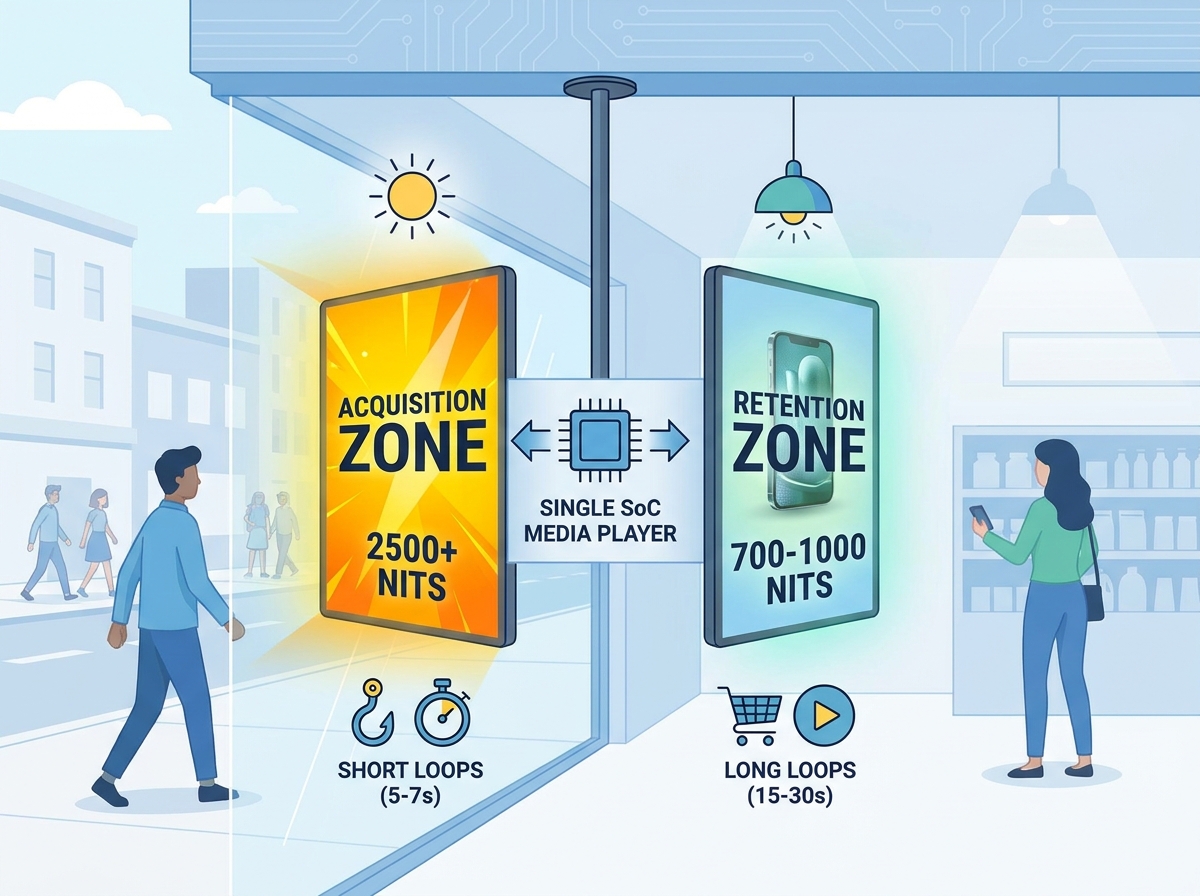
Retail storefronts face a critical dual mandate today. They must stop busy pedestrians in their tracks. Simultaneously, they must keep existing store visitors fully engaged. Relying on traditional single-facing screens wastes your highest-value physical real estate. Upgrading to a double sided window display solves this spatial constraint instantly.
However, this hardware shift introduces fresh operational complexities. You now face unique challenges in content management. Hardware evaluation and thermal regulation require careful planning. Retailers can no longer just mirror simple videos on both sides. You cannot expect meaningful results without targeted marketing tactics. To achieve maximum impact on dual-screen investments, you must align asymmetric hardware specifications with specific content strategies. You need to strategically treat the street and the shop floor as entirely distinct conversion zones. Mastering this physical and digital divide separates successful retail campaigns from mediocre window dressings.
Key Takeaways
- Asymmetric Brightness is Mandatory: Outward-facing screens require 2500+ nits to combat direct sunlight, while inward-facing screens cap at 700–1000 nits to prevent blinding in-store shoppers.
- Audience Segmentation: Effective dual facing retail screen content separates the "hook" (outward) from the "upsell" (inward).
- Unified Management: Modern commercial displays handle indoor outdoor advertising messages through a single System-on-Chip (SoC) or media player, cutting licensing and hardware costs in half.
- Deployment Logistics: Suspended installations require careful structural load assessments and concealed cable management to maintain a premium aesthetic.
![Double Sided Window Display Implementation Guide]()
The Hardware Reality: Evaluating Double Sided Window Display Specs
When planning your digital signage, hardware specifications matter immensely. You must balance two completely different lighting environments simultaneously. The street-facing side deals directly with harsh sunlight and reflections. Meanwhile, the interior side operates under carefully controlled ambient store lighting. Choosing the right panel technology ensures long-term operational stability.
Combating Solar Glare vs. Ambient Light
Your outward-facing panel demands a strict brightness baseline. It needs a minimum of 2500 nits of luminance. This high brightness guarantees vivid visibility through polarized sunglasses. It also cuts through intense direct UV exposure without washing out the colors. Without this high-nit rating, external displays look completely black to passersby on sunny days.
Conversely, over-illuminating the inward-facing panel remains a frequent mistake. You risk physically blinding your in-store shoppers. Heavy glare destroys the comfortable shopping atmosphere. Because of this, industry standards cap interior ambient lighting displays at 700 to 1000 nits. This specific asymmetric brightness model is non-negotiable for retail environments. It provides maximum external impact while preserving interior comfort.
Thermal Management and Thickness
Running two high-brightness panels back-to-back generates massive amounts of internal heat. Retailers must evaluate hardware cooling mechanisms with extreme rigor. Poor thermal management leads directly to catastrophic hardware failure or screen blackening. Fanless thermal designs represent the ultimate gold standard here. They rely on advanced aluminum heat sinks to dissipate thermal loads efficiently. They prevent overheating without adding any disruptive mechanical fan noise to your store.
Furthermore, you should seek out ultra-slim hardware profiles. Many premium dual-screen models maintain a total thickness under 30 millimeters. This remarkably thin footprint keeps the aesthetic incredibly sleek. It minimizes physical intrusion into your valuable shop floor space. Bulky enclosures look outdated and block natural daylight from entering the store.
Mounting Architecture
Installation methods directly impact your storefront structural integrity. You typically choose between two standard mounting options. First, you have ceiling-suspended wire kits. Second, you can utilize rigid floor stands. Suspended setups offer a highly modern, floating appearance. This maximizes visibility and keeps floor space completely clear for merchandise.
However, suspended mounting carries strict structural prerequisites. Standard commercial drop ceilings rarely support the heavy weight of dual-screens. Installers usually require reinforced unistrut framing anchored directly to the true concrete ceiling above the tiles. Always verify structural load limits meticulously before approving any mounting plan. Failing to reinforce the ceiling invites severe safety hazards.
Mapping the Customer Journey: Dual Facing Retail Screen Content Strategies
Hardware only provides the blank canvas. Your visual messaging drives the actual retail conversions. To maximize impact, you need dedicated dual facing retail screen content. You must intentionally separate the external hook from the internal upsell. Copying and pasting the same video on both sides wastes a massive opportunity.
Outward-Facing Content (The Acquisition Zone)
Your primary goal here focuses strictly on interruption. You want to stop the pedestrian commute. You must drive immediate footfall through your doors. High-contrast visuals work best against unpredictable outdoor glare. Use macro product shots to grab attention instantly. Display limited-time promotional hooks to create urgency. Dynamic motion graphics catch the human eye quickly from a distance.
Dwell times on the busy street are incredibly short. Pedestrians typically walk past your window in seconds. Therefore, you should design rapid 5-to-7-second message loops. Keep text minimal and highly legible. If pedestrians cannot read the offer in three seconds, they will simply keep walking.
Inward-Facing Content (The Retention & Upsell Zone)
Inside the store, the customer mindset shifts completely. You want to increase basket size and promote ongoing loyalty programs. You also have significantly more time to reinforce your brand identity. Shoppers linger longer in this controlled space. Your content tactics should evolve accordingly.
Include detailed lifestyle imagery. Showcase real people using your products. Place prominent QR codes to encourage store app downloads. Highlight complementary product pairings visually. Dwell times inside easily allow for slower 15-to-30-second message loops. The interior screen acts as a silent salesperson, guiding customers toward higher-margin purchases.
Table: Strategic Division of Dual-Screen Messaging
| Strategy Element | Outward-Facing (Acquisition) | Inward-Facing (Retention) |
| Primary Goal | Interrupt commute, drive immediate footfall | Increase basket size, build brand loyalty |
| Ideal Loop Duration | 5 to 7 seconds | 15 to 30 seconds |
| Visual Tactics | High-contrast colors, macro product shots | Lifestyle imagery, QR codes, product pairings |
| Text Density | Minimal (1-3 bold words max) | Moderate (scannable bullet points, clear CTAs) |
Structuring Shop Display Content Zones and Playlists
Modern displays eliminate the cumbersome need for dual media players. Enterprise-grade hardware efficiently manages two entirely separate video outputs from one single internal source. This simplifies your network architecture dramatically.
Single Media Player Efficiency
You can effectively route complex indoor outdoor advertising messages through one internal System-on-Chip (SoC). This cuts potential hardware failure points in half. It also reduces your network bandwidth strain.
However, you must carefully assess your Content Management System (CMS) capabilities. Ensure the software allows users to publish different playlists to "Screen A" and "Screen B" entirely independently. Merely mirroring the exact same content defeats the strategic purpose of the dual-screen investment. You need granular control over each panel to execute targeted campaigns properly.
Designing Shop Display Content Zones
Effective visual layouts require strategic shop display content zones. You do not have to limit yourself strictly to full-screen videos. Many successful retailers split the inward screen dynamically to serve multiple purposes.
- Assign 70% of the upper screen space to high-quality lifestyle video loops.
- Allocate 20% along the side to a live pricing API or interactive social media feed.
- Anchor the bottom 10% edge with a static QR code zone for persistent scanning access.
Establish strict visual hierarchy rules when zoning. You must prevent cluttered messaging at all costs. Too much text or competing motion graphics quickly fatigues the viewer. Keep the zones distinct and use negative space to guide the eye naturally.
Maximizing Relevance with a Storefront Daypart Playlist
Foot traffic demographics change drastically throughout the operational day. Your screens should adapt to these demographic shifts automatically. Static day-long playlists waste valuable conversion opportunities.
Time-of-Day Audience Shifts
Analyze your local neighborhood foot traffic patterns closely. Morning commuters usually grab quick items on their rapid way to work. Lunchtime office workers browse differently than relaxed evening leisure shoppers. Your messaging must reflect these constantly shifting consumer mindsets.
For example, a busy professional at 8:00 AM responds to speed and convenience. At 7:00 PM, that same person might respond better to experiential or premium lifestyle imagery. Acknowledging this difference is key to localized marketing.
Automating the Playlist Strategy
You can configure a robust storefront daypart playlist in your CMS easily. This powerful feature triggers specific media assets based on the exact time of day. Consider deploying this practical daily framework:
- 8:00 AM to 11:00 AM: Outward screens push high-energy coffee and breakfast combos. Inward screens promote quick-grab office accessories.
- 11:00 AM to 2:00 PM: Outward screens highlight quick-service lunch deals. Inward screens emphasize loyalty program sign-ups.
- 2:00 PM to 5:00 PM: Both screens shift to high-margin lifestyle products.
- 5:00 PM to Close: Outward screens promote evening events, dinner specials, or weekend sale previews.
Automation completely removes the need for manual daily adjustments. It keeps your campaigns highly relevant to the immediate audience standing right outside your door.
Implementation Risks and Deployment Logistics
Deploying dual-screen setups involves specific structural and regulatory hurdles. You must plan for these operational realities well before purchasing hardware. Neglecting deployment logistics often causes severe launch delays.
Hidden Installation Costs and Cabling
You must address the physical realities of cable routing early. Power cords and heavy ethernet cables cannot simply hang loosely behind the glass. They must run flawlessly through suspension cables or rigid floor poles. This strategy conceals the wiring completely. It maintains a clean, premium visual look from every angle.
Exposing messy cables instantly degrades the high-end retail aesthetic. Discuss cable management options with your AV integrator during the site survey. Ensure they use slim profile, high-capacity cables to fit inside the mounting poles.
Software Licensing Models
Clarify your CMS software pricing models upfront. You need to verify exactly how the software provider structures their service fees. Do they charge per physical screen face, or do they charge per media player? A dual-sided display utilizing one single SoC should ideally incur only one software license fee. Clarifying this technicality prevents unnecessary recurring budget drains down the line.
Compliance and Permitting
Local municipalities frequently regulate outward-facing digital signage strictly. You will likely face local restrictions regarding screen brightness limits and motion graphics after dark. City planners aim to reduce traffic distractions and ambient light pollution.
To maintain strict legal compliance, ensure your display supports automated brightness scheduling. This vital feature dims the outward screen automatically at sunset. It helps you comply seamlessly with local light pollution ordinances. It also saves significant electrical energy during nighttime operating hours.
Conclusion
A double-sided display represents much more than a simple hardware upgrade. It acts as a physical bifurcation of your entire retail marketing funnel. You actively separate initial acquisition on the street from deep retention on the shop floor. Retailers who grasp this distinction see dramatic improvements in storefront engagement.
Prioritize commercial-grade panels featuring proper asymmetric brightness. Always pair them with a robust CMS capable of independent dual-screen management. Before finalizing any hardware procurement, demand a technical site survey. Assess your exact window sun exposure thoroughly. Calculate your ceiling load capacity accurately to prevent installation hazards.
Thorough preparation ensures your storefront transforms smoothly. By matching the right hardware with divided content strategies, you turn static windows into highly effective dual-conversion machines.
FAQ
Q: Can I play the same content on both sides of a double sided window display?
A: Yes, most CMS platforms allow seamless mirroring across both panels. However, best practice dictates separating your indoor and outdoor advertising messages. This approach matches the distinct mindsets of fast-moving street traffic versus lingering in-store shoppers, maximizing the impact of each screen.
Q: How do dual-sided displays connect to the internet?
A: They typically feature built-in Wi-Fi and RJ45 ethernet ports. Hardwired ethernet remains strongly recommended for network stability. This wired connection is especially crucial when pushing large, high-resolution 4K video files to two separate screens simultaneously without buffering issues.
Q: Will the outward-facing screen overheat in direct sunlight?
A: Commercial-grade window displays utilize high TNI (Twisted Nematic) liquid crystal panels. Manufacturers design these specialized panels to withstand internal surface temperatures up to 110°C (230°F) without suffering from permanent blackening defects commonly seen in consumer TVs.
Q: Do I need two software licenses for one dual-sided screen?
A: It depends heavily on the internal hardware architecture. If the display uses a single internal System-on-Chip (SoC) to drive both panels, most CMS providers only require one license. Always verify this specific billing structure directly with your chosen software vendor.