Deploying untethered digital displays solves massive placement constraints. It frees screens from rigid wall mounts and hidden power outlets. Yet, this newfound freedom introduces a critical logistical vulnerability. You now have to actively manage power on the floor. Moving from a small pilot program to a full-scale fleet changes the game. You can no longer rely on ad-hoc charging routines. Plugging a display in only when it dies simply will not work across dozens of units.
Instead, you need a systematized standard operating procedure (SOP). We designed this guide to help operations and facility managers build exactly that. You will learn an objective, scalable framework to evaluate actual power needs. We will show you how to construct a sustainable charging workflow. Finally, you will discover actionable strategies to protect your display investment.
Managing these devices correctly guarantees reliable brand messaging. It prevents blank screens during peak foot traffic. Best of all, we ensure you achieve optimal screen uptime without overburdening your daily floor staff.
Key Takeaways
- Establishing a reliable baseline for power draw requires factoring in brightness, content type, and environmental variables, not just manufacturer spec sheets.
- A standardized workflow prevents downtime; charging responsibilities must be explicitly tied to shift handoffs.
- Hardware evaluation must account for charging infrastructure limits (e.g., circuit loads) and battery accessibility (built-in vs. swappable).
- Software-level power management (scheduling, auto-dimming) extends battery lifespans and reduces charging frequency.
Why Ad-Hoc Charging Fails at Scale
Treating display charging casually creates immediate business risks. Unplanned display downtime results directly in blank screens. A blank screen on the sales floor creates a highly negative brand impression. It nullifies the entire purpose of your digital signage investment. Customers perceive dead screens as broken hardware. This reflects poorly on retail maintenance standards.
Human error heavily compounds this problem. Relying on floor staff to notice low-battery indicators rarely succeeds. Employees juggle multiple tasks during busy shifts. They often miss subtle warning lights. This negligence leads to inconsistent charging habits. Worse, it triggers deep-discharge events. Draining a lithium-ion battery to zero permanently degrades the internal cells. Repeated deep discharges will ruin an expensive battery pack in months rather than years.
You must establish strict standard operating procedures. Successful deployments require treating display charging as a routine facility maintenance task. You already require staff to lock doors. You expect them to run end-of-day sales reports. Managing digital display power demands the exact same level of daily compliance. Without a formal process, accountability disappears. Blank screens become a frequent, frustrating reality.
![Battery-Powered Signage Charging Plan]()
Establishing Your Screen Power Consumption Estimate
Manufacturers often publish optimistic runtime numbers. These spec sheets represent optimal, laboratory-controlled conditions. Real-world usage requires calculating a contextual screen power consumption estimate. You cannot blindly trust the brochure when planning your shift schedules.
Several distinct variables directly impact battery draw. You must evaluate each factor carefully.
- Luminance (Nits): Brightness dictates power usage. Running a display at 1000+ nits in a sunlit atrium draws massive energy. The same screen running at 400 nits in a shaded aisle lasts twice as long.
- Content load: Heavy video processing drains batteries fast. Continuous 4K video playback requires intense processor activity. Static images or simple text formats consume far less internal power.
- Thermal environment: Temperature affects lithium-ion chemistry. Extreme cold significantly reduces battery efficiency. Meanwhile, excessive heat accelerates internal degradation.
You need an actionable step to find true baselines. We strongly advise conducting a controlled retail sign battery test. You must run your specific content loop at the required brightness level. Place the unit in the actual deployment environment. Log the exact time it takes to drain from full to twenty percent.
To run this test properly, follow these numbered steps:
- Charge the display to exactly one hundred percent.
- Deploy the screen in its intended daily location.
- Set the brightness to match the ambient lighting needs.
- Start your heaviest daily content loop.
- Check the battery level every sixty minutes and log the drop.
This localized test provides a highly accurate baseline. You must establish this baseline before finalizing any operational schedule.
Designing the Portable Display Charging Schedule
A successful portable display charging schedule must integrate seamlessly into daily operations. If the routine disrupts regular staff duties, employees will skip it. You must align the process naturally alongside existing workflows.
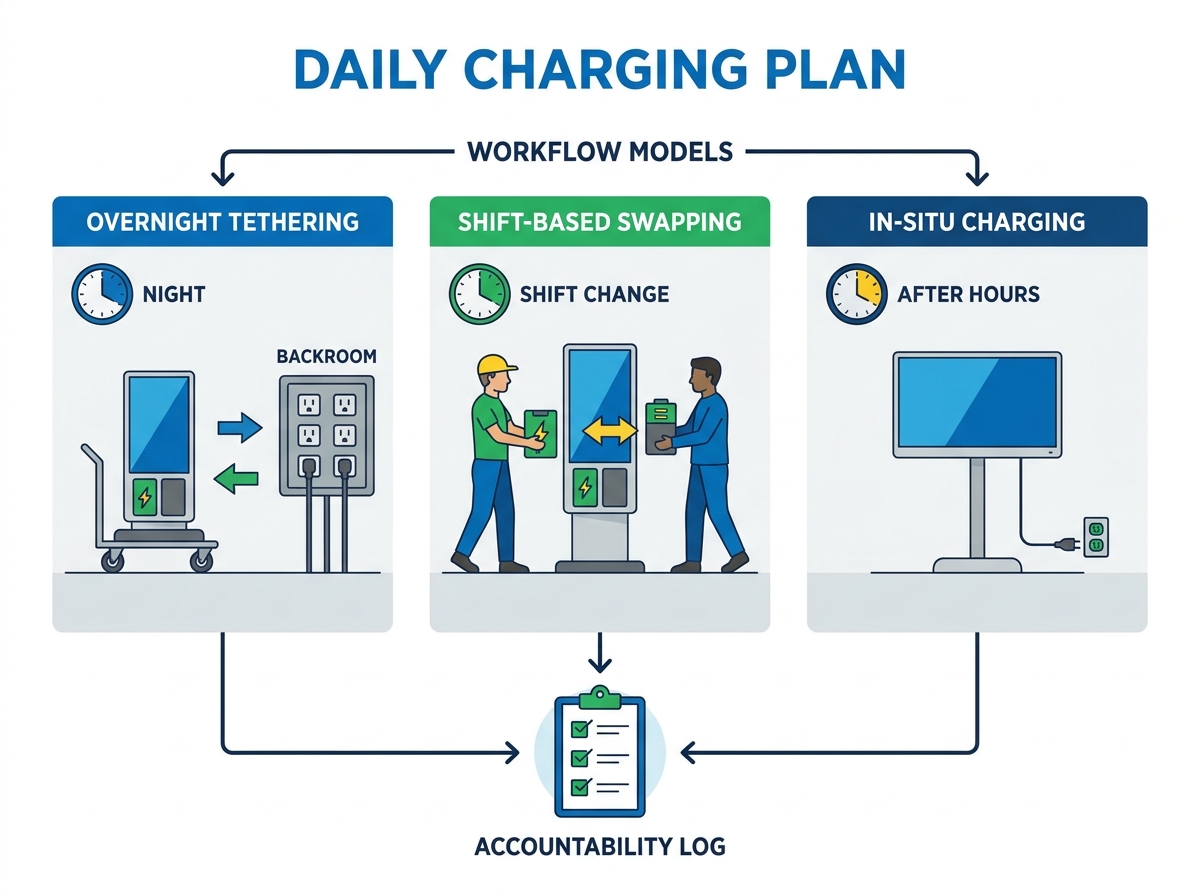
Facilities managers generally evaluate three primary workflow models. Each approach offers distinct operational tradeoffs.
Table 1: Charging Workflow Models Compared
| Workflow Model | Description | Pros | Cons |
| Overnight Tethering | Moving units to a secure backroom for overnight charging. | Centralized process; highly secure. | Requires physical movement of heavy units daily. |
| Shift-Based Swapping | Utilizing hot-swappable battery packs at shift changes. | Perfect for 24/7 operations; screens never move. | Requires purchasing extra modular batteries. |
| In-Situ Charging | Running power cables to the displays after hours. | Zero heavy lifting required. | Tripping hazards if cables are poorly managed. |
Once you select a model, you must enforce accountability. Assigning general responsibility rarely works. You need to assign specific roles. For example, make tethering the explicit duty of the closing manager. Alternatively, assign battery swapping to the night security team.
We recommend utilizing simple sign-off logs. Digital checklists on employee tablets work exceptionally well. When a staff member plugs a unit in, they tap a button confirming the action. This creates a transparent compliance trail. It stops the dangerous "I thought someone else did it" excuse entirely.
Hardware Evaluation: Infrastructure and Fleet Selection
Evaluating commercial battery powered digital signage requires careful planning. The choice of hardware dictates the entire complexity of your charging plan. You must match the equipment to your facility limitations.
First, consider battery accessibility. Displays feature either built-in batteries or swappable sleds. Built-in batteries offer a sleeker exterior design. However, they require staff to move the entire unit to a power source. Swappable battery sleds solve this mobility issue. They allow the heavy display to remain exactly in place. Staff simply cycle modular batteries through a back-of-house charging dock.
Next, you must assess backroom electrical load constraints. Facilities managers often overlook basic circuit capacity. Plugging ten high-capacity fast chargers into a single 15-amp breaker creates chaos. It will undoubtedly cause localized power failures. You cannot afford tripped breakers in a busy retail environment.
Use strict shortlisting logic here. Look for charging stations featuring smart load-balancing. These systems distribute power evenly across multiple batteries. They prevent sudden amperage spikes. This technology proves invaluable if your backroom infrastructure remains limited.
Finally, prioritize compliance and safety above all else. You must ensure commercial-grade certifications. Demand UL or CE certifications for both the batteries and the charging docks. Consumer-grade electronics pose severe fire risks in commercial warehouses. Enterprise environments require rigorous thermal protection standards. Do not compromise on hardware safety ratings under any circumstances.
Maximizing Rechargeable Advertising Screen Runtime
Hardware upgrades alone cannot solve power efficiency completely. Software-level interventions remain absolutely critical. Fleet management software transforms how you handle daily power usage. It removes the burden of manual adjustments from your floor staff.
You should deploy two primary implementation tactics immediately.
First, utilize aggressive dayparting and scheduling. Program your screens to automatically sleep during off-hours. If your store closes at nine, the screen should power down at nine-fifteen. Stopping video playback overnight saves massive amounts of battery life. The screen awakens automatically right before the morning shift begins.
Second, activate ambient light sensors. Most enterprise displays include auto-dimming features. The screen automatically reduces brightness as evening approaches. It also dims when heavy cloud cover rolls in. Dropping the backlight from eighty percent to forty percent slashes power draw. Staff never have to touch a remote control to adjust it.
Beyond software tweaks, you must practice strict battery health preservation. Avoid the zero percent trap at all costs. Lithium-ion batteries degrade much faster when completely drained. A battery pushed to zero daily will lose capacity quickly.
You should standardize the daily charging plan aggressively. Instruct staff to top off batteries at twenty or thirty percent. Recharging before the battery dies completely reduces chemical stress. This specific habit maximizes the overall lifecycle of your rechargeable advertising screen runtime. You gain years of reliable service just by avoiding deep discharges.
Conclusion
A scalable deployment of untethered displays relies entirely on predictable routines. If your charging plan remains chaotic, your signage network will fail. Treating power management as a strategic operational workflow protects your hardware lifespan. It elevates charging from an afterthought to a core daily duty. This operational rigor guarantees maximum display uptime.
Uptime represents the true return on your process. When screens remain bright and active, they capture audience attention effectively. Blank screens only signal neglect. By standardizing your approach, you eliminate the negative brand impacts of dead hardware.
Your next steps are clear and actionable. Audit your current backroom infrastructure capacity immediately. Run a localized battery test using your heaviest media content. Finally, evaluate your prospective signage hardware carefully. Ensure the equipment actually supports a realistic, sustainable daily maintenance loop for your specific facility.
FAQ
Q: How much does content type actually affect battery drain on a digital sign?
A: Static images with lower refresh rates draw marginally less processor power. However, the primary power draw always remains the backlight. A bright static image will drain a battery significantly faster than a dark video. You must balance both visual brightness and processing load for optimal longevity.
Q: How often do commercial digital signage batteries need to be replaced?
A: Under daily commercial use, standard lithium-ion commercial batteries maintain optimal capacity for two to three years. This assumes charging cycles happen five to seven days a week. Lifespan depends heavily on depth of discharge habits. Avoiding zero-percent drains extends this timeframe notably.
Q: Is it safe to leave digital signage batteries charging constantly over the weekend?
A: Enterprise-grade commercial displays feature integrated Battery Management Systems (BMS). These systems cut off power flow once the battery reaches full capacity. This prevents dangerous overcharging. Always verify your specific hardware utilizes smart-charging technology before leaving any units unattended for extended periods.
Q: Can I charge multiple portable displays on a standard wall outlet?
A: It depends entirely on the charger's wattage and the circuit's amperage. A standard 15-amp circuit provides roughly 1440 watts of continuous safe power. You must calculate the combined maximum draw of all active chargers. This calculation helps avoid tripping breakers during simultaneous fleet recharging.