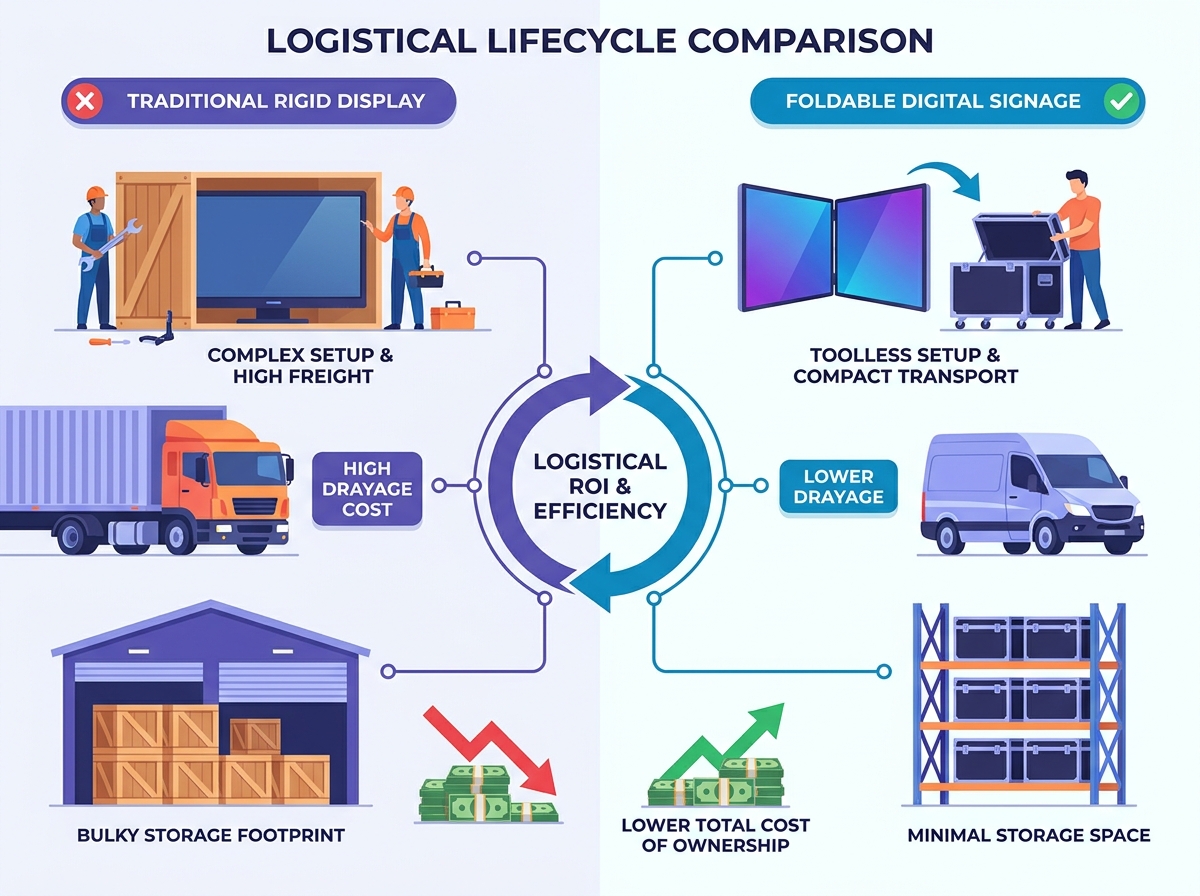
Deploying high-impact digital screens in temporary environments often creates massive logistical friction. Heavy drayage costs, rigid union labor rules, and the constant threat of physical damage plague traditional A/V setups. You need a smarter way to deliver stunning visual content without the heavy freight burden. We define foldable digital signage as a strategic alternative to rigid displays for high-frequency pop-up events, retail activations, and trade shows. This modular hardware dramatically reduces transport headaches while maximizing screen real estate. Our purpose in this guide is straightforward. We want to provide event managers, retail marketers, and logistics coordinators with a clear evaluation framework. You will learn exactly how to assess the transport requirements, setup procedures, and long-term storage realities of foldable displays before making a major procurement decision.
Key Takeaways
- Logistical ROI: Foldable digital signage drastically reduces shipping volume and trade show drayage costs compared to traditional rigid screens.
- Protection is Priority: Investing in a customized portable poster transport case is critical to mitigating hinge and panel damage during LTL (Less Than Truckload) shipping.
- Labor Efficiency: True pop up display setup must be toolless to bypass costly venue labor minimums and reduce time-to-live.
- Total Cost of Ownership: While upfront unit costs are higher, the reduction in required folding screen storage space and specialized freight handlers often offsets the initial premium within a single event season.
The Business Case for Foldable Digital Signage at Pop-Up Events
Traditional A/V event rentals carry significant hidden costs. Event managers frequently underestimate the financial drain of freight size and custom crating. When you rent or own standard rigid screens, you pay for massive shipping crates. These oversized crates incur high freight classifications. They also trigger steep drayage fees at convention centers. Convention drayage bills by hundredweight (CWT). Rigid screens demand heavy materials and costly third-party setup crews.
Foldable screens offer a compelling alternative. Hinged, modular, and flexible LED and LCD technologies have matured rapidly. Manufacturers now deliver commercial-grade brightness without the restrictive rigid footprint. You can fold a massive display into a compact footprint. This allows you to transport high-impact screens in standard courier vans. You bypass the need for dedicated freight trucks entirely.
You evaluate success in this category through strict logistical metrics. A successful deployment reduces freight classifications. It lowers your overall drayage weight on the show floor. It eliminates the need for specialized union assembly labor. Event teams gain agility and speed. They can deploy visual assets faster and cheaper.
We operate under a transparent assumption here. Foldable units function primarily as a logistics solution. They are not simply a visual novelty. If transport costs do not present a primary pain point for your team, standard rigid displays might offer a lower entry price. You buy foldable technology to solve expensive movement and storage problems.
Logistics Comparison: Rigid vs. Foldable Displays
| Logistical Metric | Standard Rigid Screens | Foldable Digital Screens |
| Freight Footprint | Oversized custom crating required. | Compact cases fit standard pallets. |
| Drayage Costs | High (Billed by massive hundredweight). | Low (Significantly reduced casing weight). |
| Setup Labor | Requires external A/V crews and tools. | Toolless deployment by internal staff. |
| Shipping Method | Dedicated LTL or full truckload freight. | Standard courier or consolidated LTL. |
Mobile Advertising Sign Handling and Transport Strategies
Transporting sensitive electronics requires careful vulnerability mapping. You must identify the primary points of failure before you ship anything. Foldable displays face three specific threats during transit. Hinge stress occurs when cases vibrate violently on truck beds. Exposed panel edges suffer impact damage from poor packing. Internal cable pinching happens if teams fold the units improperly. You must address these vulnerabilities through proactive logistics planning.
Your protective gear matters immensely. Standard cardboard boxes or soft padded bags fail consistently in commercial LTL shipping. Forklifts easily pierce soft materials. Top-heavy pallets crush cardboard instantly. You must invest in a robust portable poster transport case. This investment protects your fragile screen assets from catastrophic transit damage.
ATA-rated flight cases provide the necessary protection. They feature heavy-duty metal corners and reinforced plywood walls. A proper flight case requires custom-cut high-density foam inserts. This foam prevents micro-vibrations from destroying delicate hinges. You also need shock-absorbing casters to handle rough loading docks. We highly recommend installing tip-indicators on the case exterior. These small devices alert you if carriers lay your screens flat incorrectly.
Freight handlers require clear instructions. You must enforce strict mobile advertising sign handling protocols. Communicate explicitly with your third-party logistics (3PL) providers. Palletize your foldable units upright. Band them tightly to the pallet base. Wrap the entire pallet securely to prevent any unauthorized top-loading. Carriers often stack freight to maximize trailer space. A dedicated pallet footprint prevents heavier crates from crushing your valuable screens.
![Foldable Digital Signage Setup]()
Pop Up Display Setup: Field Realities and Assembly
Labor rules govern major convention centers aggressively. If your team uses a screwdriver, you often trigger mandatory union labor requirements. This adds massive delays and unexpected expenses. A profitable pop up display setup relies entirely on a toolless architecture. Manufacturers design premium foldable screens using magnetic locks and hand-tightened tension knobs. Your internal marketing staff can assemble these units legally and swiftly.
Step-by-step deployment requires careful field execution. First, evaluate the uncasing process. Smaller screens often allow a one-person setup. Units larger than 55 inches demand a two-person minimum. You must lift and unhinge the chassis evenly to prevent torsion stress. Uneven lifting causes structural warping over time.
Next, focus on the locking mechanisms. You must secure the central hinge completely. A properly locked hinge ensures a seamless bezel appearance. It also guarantees structural stability against accidental bumps. Once unfolded, evaluate the base weighting. High-foot-traffic areas demand strict anti-tip compliance. You may need integrated steel base plates or specialized sandbag covers. Venue safety inspectors check these footprints rigorously.
Power and connectivity present the final field hurdle. Temporary pop-up spaces rarely offer clean cable routing. You must tape down power cables safely to avoid trip hazards. Minimize your reliance on external media players. Modern foldable displays feature internal System on Chip (SoC) media players. Teams manage content via 4G or 5G cellular routers. This eliminates messy HDMI cables and external hardware dependencies.
Post-Event Logistics: Optimizing Folding Screen Storage Space
When the event ends, asset preservation begins. Transitioning from rigid video walls to folded units drastically reduces your warehouse footprint. Event teams routinely save up to sixty percent on floor space. You must accurately calculate your required folding screen storage space. Base this calculation entirely on the external dimensions of the flight cases, not the deployed screen size. Efficient stacking maximizes your cubic storage capacity.
Environmental controls remain absolutely vital. Warehouses fluctuate wildly in temperature and humidity. Prolonged exposure to extreme cold or high humidity damages delicate electronics. Condensation forms inside LCD and LED components. This moisture causes severe delamination and electrical shorts. You must store these assets in a climate-controlled facility. Keep temperatures between 60 and 75 degrees Fahrenheit. Maintain relative humidity below fifty percent.
Establish strict maintenance protocols between deployments. Do not simply throw equipment back onto the storage rack. Implement standard operating procedures to protect your investment. A proper post-event checklist ensures readiness for the next show.
- Clean all screen surfaces using manufacturer-approved microfiber cloths and non-ammonia solutions.
- Inspect every hinge mechanism for micro-fractures, loose tension knobs, or metal fatigue.
- Test the internal media players and cellular routers to verify software integrity.
- Charge internal batteries fully before long-term storage, checking them periodically to prevent deep-discharge damage.
Evaluation Framework: Shortlisting the Right Hardware for Your Fleet
Procuring foldable display fleets requires a systematic evaluation. You cannot rely on spec sheets alone. You must balance physical durability against strict logistical limits. Event managers need a concrete framework to separate reliable hardware from fragile novelties. Apply the following criteria when shortlisting manufacturers.
- Build Quality vs. Weight: You face a constant balancing act here. A robust metal chassis survives aggressive handling. However, heavy units trigger expensive oversized courier fees. You want to keep the fully cased unit under the standard UPS or FedEx oversized weight thresholds. Aluminum alloys offer the best compromise between rigid protection and manageable weight.
- Pixel Pitch and Viewing Distance: Choose your resolution based on your specific pop-up environments. Indoor retail activations demand fine pixel pitches (e.g., 1.5mm to 2.0mm). Shoppers stand very close to these screens. Outdoor or semi-outdoor event tents require durable, brighter pitches (e.g., 3.9mm or higher). Outdoor screens sacrifice ultra-fine resolution for peak brightness and impact resistance.
- Warranty and Servicing: Read the manufacturer warranty carefully. Focus specifically on mechanical failure points. Hinge mechanisms and internal flex-cables take immense abuse during folding cycles. Ensure your warranty explicitly covers these moving parts. Ask manufacturers about their domestic repair turnaround times.
- Software Ecosystem: Your hardware must integrate smoothly with your content strategy. Ensure the built-in SoC supports your existing remote device management (RDM) software. Your marketing team needs the ability to push content globally. They must monitor screen health remotely across multiple temporary deployments.
Conclusion
The event industry continues to shift away from renting temporary A/V equipment. Forward-thinking brands now own and manage their own foldable screen fleets. This transition grants ultimate creative control and significantly lowers recurring rental fees. Foldable display technology removes the traditional barriers of massive freight costs and complex union labor requirements.
Successful deployment relies heavily on meticulous logistics planning. Hardware quality matters, but transport protection matters equally. You must prioritize ATA-rated flight cases, enforce strict carrier handling rules, and maintain climate-controlled storage environments. Skipping any of these logistical steps dramatically reduces the lifespan of your screens.
Your next step requires data gathering. Audit your company's past year of drayage, freight, and A/V rental receipts. Calculate exactly how much money you burned on moving and setting up rigid screens. Use this financial data to build your business case. Once you understand your current logistical waste, you can confidently request hardware demos from leading foldable signage manufacturers.
FAQ
Q: How much weight does a portable poster transport case add to foldable digital signage?
A: A commercial-grade ATA flight case typically adds 40 to 60 pounds to your total shipment weight. While this increases the overall mass, the customized high-density foam and impact-resistant exterior are non-negotiable. This added weight prevents catastrophic damage during LTL transit, saving you thousands in replacement costs.
Q: Can one person complete a foldable pop up display setup?
A: Yes, if the screen size remains under 55 inches. Manufacturers design these smaller units with gas struts and balanced hinges for easy solo deployment. However, units exceeding 55 inches require a two-person team. Lifting massive screens unevenly causes severe torsion stress on the central hinge mechanism.
Q: Does folding the screen leave a visible seam or gap?
A: It depends on the specific hardware technology. Dual-screen hinged LCD models will always feature a small physical bezel down the center. Conversely, advanced flexible LED modules create a completely seamless visual canvas when unfolded. You must clarify your visual expectations with the manufacturer before purchasing.
Q: What is the minimum folding screen storage space required for a multi-city tour?
A: You calculate storage space based entirely on the external dimensions of your rugged transport cases, not the screens themselves. Measure the cubic footprint of the cases. Factor in vertical stacking limits. Always add a twenty percent buffer space to allow safe maneuvering of forklifts inside your storage facility.