Deploying interactive hardware rarely lives up to "plug and play" marketing promises. Connecting peripheral hardware often requires complex troubleshooting before systems function properly. IT implementers and operations managers face immense friction when bridging physical components, like printers and scanners, with secure payment processing software. A mismatched connection can cause system crashes, stalled transactions, or critical security vulnerabilities.
Successful deployment requires rigorous evaluation of SDKs, hardware interfaces, and environmental variables before committing to a vendor. You must look beyond standard retail setups. Unattended environments demand specialized configurations to handle constant use without human supervision. We will explore how to navigate these challenges effectively. You will learn the best practices for integrating POS terminals, managing physical deployment risks, and securing peripheral handshakes. This ensures your self-service setup remains reliable, compliant, and ready for scale.
Key Takeaways
- Unattended environments dictate hardware choice: Standard retail peripherals often fail in unattended setups without proper sensor integrations and durable interfaces.
- Software handshakes matter most: Relying on basic USB connections without robust API/SDK integration leads to unmonitored hardware failures (e.g., undetected paper jams).
- Payment compliance is non-negotiable: Implementing unattended card reader compatibility requires evaluating PCI-PTS certifications and end-to-end encryption protocols early in the procurement cycle.
- Modular vs. All-in-One: Business success criteria dictate whether to source disparate components or invest in a pre-integrated self service payment kiosk.
Evaluating POS Terminal Kiosk Integration Frameworks
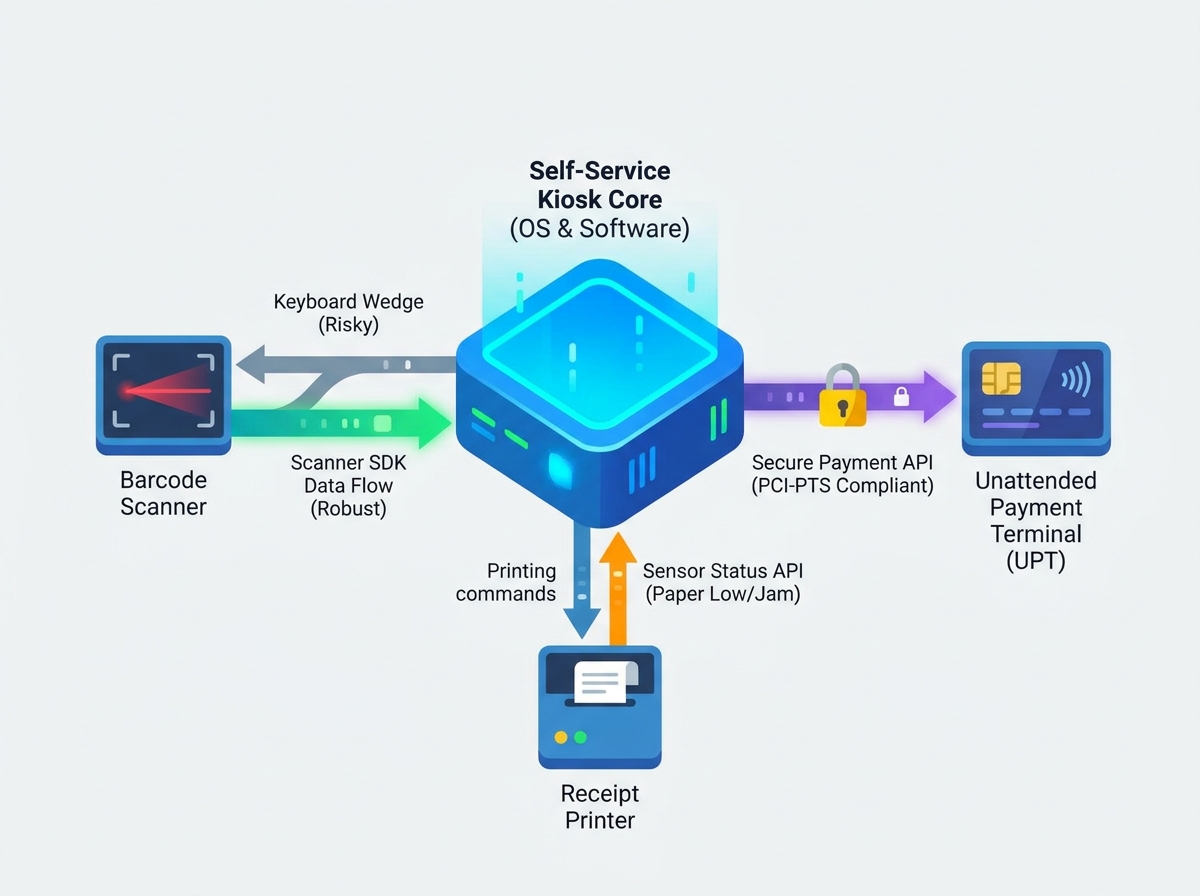
Deploying unattended hardware introduces severe compliance hurdles. You cannot simply use standard countertop POS terminals. Countertop models expect a human cashier to monitor for physical tampering. Unattended payment terminals (UPTs) operate entirely on their own. They must feature robust physical security and anti-tamper mechanisms. The Payment Card Industry PIN Transaction Security (PCI-PTS) framework dictates strict compliance for unattended environments. Standard retail terminals often lack these specific certifications. Failing to use compliant UPT hardware leaves your business open to massive liability.
Connection protocols also require careful evaluation during POS terminal kiosk integration. You must choose between cloud-based API integrations and local hardwired connections. Cloud integrations offer extreme flexibility. They allow remote updates and seamless software management. However, they remain highly network-dependent. If your internet connection drops, the kiosk stops taking payments. Local hardwired connections, utilizing serial or USB ports, provide higher reliability. They maintain terminal communication even during minor network hiccups.
We strongly recommend utilizing semi-integrated payment architectures. In a fully integrated system, sensitive card data passes through the kiosk PC. This pulls your entire kiosk software stack into the PCI compliance scope. Semi-integrated architectures isolate the payment data. The UPT handles the encryption and talks directly to the payment processor. The kiosk software only receives a basic token or approval message. This significantly reduces your security burden.
Assessing unattended card reader compatibility requires matching hardware to your chosen operating system. You must evaluate card readers for NFC, EMV chip, and magstripe capabilities. Keep your kiosk OS in mind. Windows and Android handle hardware drivers differently. Proprietary drivers often break during routine OS updates. Ensure your payment hardware vendor provides long-term driver support for your specific operating system.
![Self-Service Kiosk Hardware Integration]()
Navigating Barcode Scanner SDKs and Physical Deployment Risks
Software integration approaches directly impact barcode scanner reliability. Many developers default to keyboard wedge mode because it is simple. The scanner acts like a digital keyboard. It types the scanned barcode data directly into the active text field. However, this approach carries heavy risks. Keyboard wedge mode relies entirely on system focus. If an OS popup appears, the kiosk UI loses focus. The scanned data disappears into the void, frustrating users.
To avoid this, mandate a native barcode scanner SDK integration. SDKs provide deep programmatic control over the scanning hardware. They allow your software to communicate directly with the scanner in the background. The application window does not need active focus. This method enables silent background scanning and robust error handling. It creates a much smoother user experience.
Beyond software, environmental and hardware realities dictate scanner performance. Reading 1D and 2D barcodes from mobile screens is notoriously difficult. Ambient lighting conditions constantly change. Screen glare often blinds standard scanner optics.
Follow these best practices to mitigate physical deployment risks:
- Control ambient light: Install hoods or recessed bezels around the scanner to block direct sunlight.
- Optimize mounting angles: Tilt the scanner slightly downward to prevent overhead lights from reflecting directly back into the lens.
- Calculate focal distance: Position the scanner so users naturally hold their phones at the optimal reading distance (usually 4 to 6 inches).
- Provide visual cues: Use decals or LED indicators to show users exactly where to place their items or phone screens.
Securing the Receipt Printer Interface in Unattended Settings
Standard ESC/POS commands fail to support unattended environments adequately. Basic printing commands only push data in one direction. They tell the printer to print but do not listen for a response. In an unattended kiosk, you need two-way communication. Your central management software must know if the printer actually succeeded.
This makes sensor monitoring API requirements non-negotiable. Evaluate printers based on their ability to report specific, real-time statuses. The hardware must alert the kiosk application of specific issues. Statuses like "paper low," "paper out," and "cutter jam" are critical. When the central management system receives these alerts, it can dispatch maintenance automatically. It can also disable the printing option on the kiosk UI to prevent user frustration.
You must also assess the required receipt printer interface. Motherboard layouts and cable security dictate this choice. Standard USB connections are cheap and ubiquitous. Unfortunately, they dislodge easily due to machine vibration or accidental tugs during maintenance. RS232 (serial) connections feature physical locking screws. Ethernet connections clip securely into place. These locking interfaces provide superior stability in unattended setups.
Finally, understand the mechanical realities of user behavior. Customers will often grab a receipt before the machine finishes cutting it. This user interference guarantees catastrophic paper jams. Prevent this by mandating presenter mechanisms. A presenter holds the receipt inside the machine until the cut is fully complete. Once cut, it ejects the paper through an anti-jam bezel. This mechanical barrier protects the internal printer hardware from impatient users.
Modular Components vs. Pre-Integrated Kiosk Solutions
Building a self service payment kiosk requires choosing between modular and pre-integrated approaches. Both strategies offer unique advantages and distinct operational risks. Your decision should align directly with your internal resources and scaling timelines.
The modular approach involves sourcing separate components and building the kiosk yourself. You select the exact PC, scanner, printer, and UPT you prefer. This gives you complete control over vendor selection. It can also provide upfront cost savings on hardware. Furthermore, you can upgrade specific components easily as technology evolves. However, the cons are significant. You assume extremely high integration risks. Complex troubleshooting often leads to vendor finger-pointing. When the scanner won't talk to the PC, neither vendor wants to take the blame. This approach relies heavily on your in-house development team.
The pre-integrated approach means buying a turnkey solution from a single manufacturer. The primary advantage is guaranteed component compatibility. The manufacturer handles the hardware handshakes before shipping. You also get a unified warranty and a single throat to choke for support. This enables a much faster time-to-market. The downsides include potential vendor lock-in. You must also prepare for a higher initial capital expenditure.
Kiosk Sourcing Strategy Comparison
| Strategy | Primary Advantages | Major Drawbacks | Best Suited For |
| Modular Approach (Build) | Hardware flexibility, granular upgrades, exact component control. | Vendor finger-pointing, high integration risk, heavy dev burden. | Companies with robust internal engineering and IT teams. |
| Pre-Integrated Approach (Buy) | Guaranteed compatibility, single warranty, fast deployment. | Vendor lock-in, higher initial hardware costs, limited customization. | Businesses needing rapid scaling and unified support channels. |
Your shortlisting logic should center on internal capabilities. If your IT team is small, prioritize pre-integrated solutions. If you possess a massive engineering department, the modular route might offer better long-term agility. Consider your scaling timelines carefully. Rolling out hundreds of units quickly heavily favors the pre-integrated buy model.
Pre-Deployment Hardware Integration Checklist
You must rigorously test your kiosk hardware before widespread deployment. Field failures damage brand reputation and require expensive truck rolls. Implement a strict testing protocol to ensure your systems can survive unattended operation.
Follow this hardware integration checklist during your staging phase:
- Verify Power-Cycle Resilience: Perform hard reboots by physically pulling the power plug. Watch the machine boot up. Does the UPT reconnect to the host application automatically? Does the scanner initialize without manual intervention? If any peripheral requires a human to click "reconnect," the system fails the test.
- Confirm Peripheral Lockdown: Check physical and software security. Are USB ports physically secured behind locked doors? Have you disabled unused ports in the BIOS? Ensure you lock OS-level configurations tightly. This prevents malicious actors or curious users from plugging in rogue keyboards or unauthorized peripheral devices.
- Test Error State Recovery: Force hardware failures intentionally. Remove the paper from the receipt printer. The software must gracefully degrade. It should automatically detect the error and display an "Email Receipt Only" prompt. Unplug the scanner. The UI should instantly offer a manual barcode entry keypad. Graceful failure keeps the kiosk generating revenue even when a single component breaks.
Conclusion
Successful kiosk deployments prioritize seamless software-to-hardware handshakes over isolated component specs. You cannot build a reliable unattended system by simply plugging retail peripherals into a touchscreen PC. True reliability demands robust SDK integrations, durable interfaces, and strict adherence to payment compliance standards. By evaluating environmental realities and selecting the right modular or integrated path, you eliminate the most common failure points.
Before signing bulk procurement contracts, take decisive action. Request developer documentation, including SDKs and API wrappers, from every hardware vendor. Build a proof-of-concept testing unit to validate power-cycle resilience and error state recovery. Force the hardware to fail in a controlled environment. Once your prototype handles paper jams and network drops gracefully, you can confidently scale your self-service operations.
FAQ
Q: How do you ensure unattended card reader compatibility with an existing POS system?
A: Focus strictly on semi-integrated payment APIs. This prevents your core POS software from handling raw credit card data. Verify that the card reader's firmware holds the necessary PCI-PTS certifications. Furthermore, check that your specific payment processor explicitly certifies the terminal for unattended use before purchase.
Q: What is the most reliable receipt printer interface for a self service payment kiosk?
A: While USB is incredibly common, it is not the most reliable for unattended environments. RS232 (serial) or specialized locking USB cables are preferred. Kiosks experience heavy vibration from user interaction and internal fans. Locking cables prevent physical disconnections caused by vibration or accidental bumps during routine maintenance.
Q: Why shouldn't I use a standard barcode scanner in keyboard wedge mode for a kiosk?
A: Keyboard wedge mode requires the application window to remain perfectly active. If an OS popup, error message, or system update interrupts the kiosk software, the window loses focus. Any scanned data is instantly lost. Using a native barcode scanner SDK prevents this by passing data directly to the app logic invisibly.