Choosing the orientation for a wall-mounted display is never just a matter of aesthetic preference. It directly dictates your hardware procurement, content production workflows, and long-term installation viability. You cannot simply flip a screen sideways and expect flawless performance. An incorrect orientation choice inevitably leads to distorted content, poor spatial utilization, or severe mechanical failures when standard hardware is improperly mounted.
Displays forced into the wrong format fail to capture audience attention and frustrate end-users. To prevent these missteps, you need a precise strategy before purchasing any new equipment. This article provides a highly technical, evidence-based evaluation framework. We will help you choose between portrait and landscape orientations based on your exact spatial constraints, content types, and hardware capabilities.
You will learn how to align your physical infrastructure with your communication goals. We break down the mechanical realities of installation and how they shape viewer engagement. By the end of this guide, you will know exactly how to map your space for maximum visual impact.
Key Takeaways
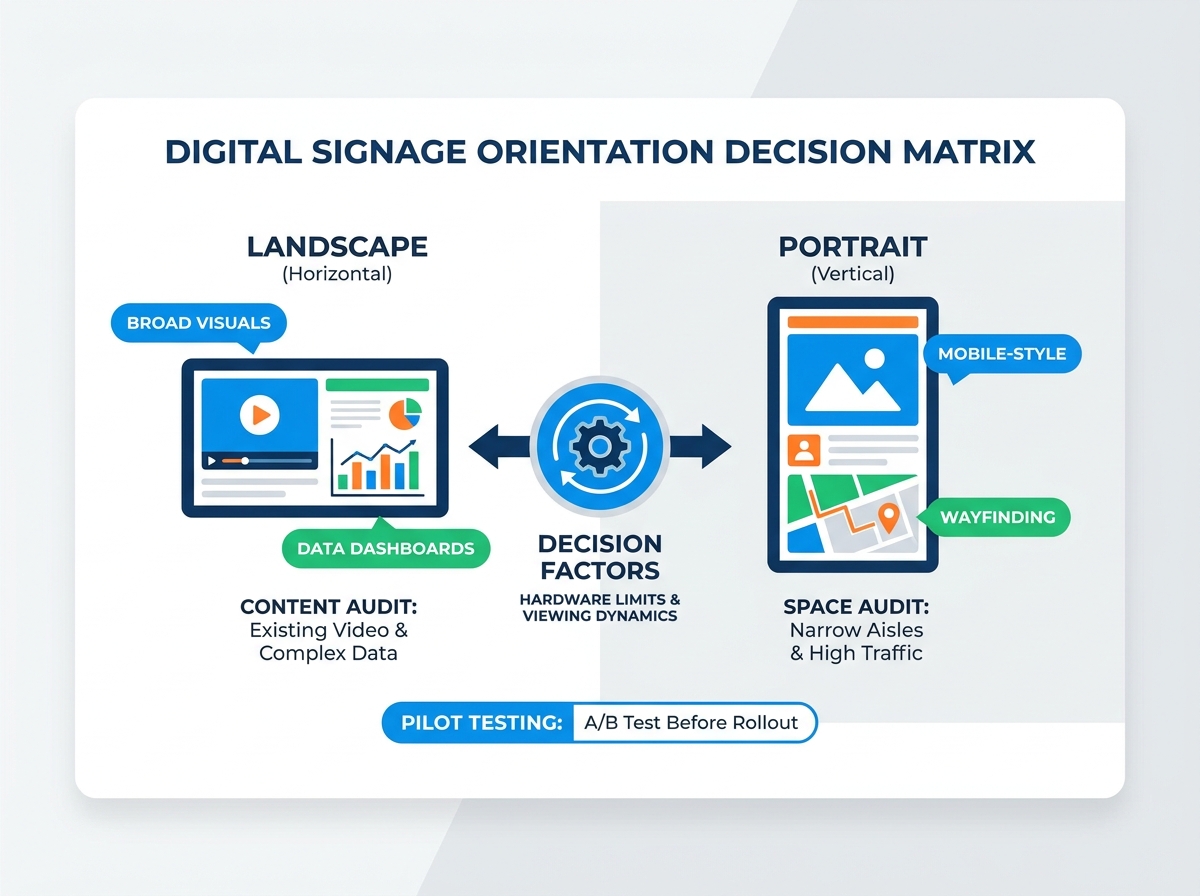
- Content defines hardware: Landscape excels at environmental video and data-heavy menus, while portrait dominates in high-traffic, mobile-style advertising and wayfinding.
- Thermal and mechanical limits: Mounting a standard display vertically without commercial-grade cooling mechanisms risks hardware failure.
- Spatial integration: Total available wall space and optimal viewing height must dictate the form factor before CMS (Content Management System) deployment.
- Interactivity shifts rules: Touchscreens require strict adherence to ergonomic viewing zones and ADA compliance, altering standard mounting heights.
The Business Impact of Display Orientation on Floor Strategy
Physical retail environments and corporate architectures demand careful layout planning. Screen orientation heavily interacts with these structural environments. Planners must evaluate how hardware footprint balances against viewer attention. A massive display mounted in a cramped hallway creates visual noise. Conversely, a small vertical screen in a massive lobby disappears from view. You must match the screen geometry to the surrounding architectural lines.
Human vision naturally favors panoramic observation. We scan our physical environments horizontally. Our visual field stretches roughly 120 degrees across but only about 60 degrees up and down. Landscape orientations align directly with this natural human vision. We process complex horizontal data fields rapidly without moving our heads. Consequently, horizontal scanning remains preferred for complex information consumption. Dashboards, schedules, and sprawling menus rely on this wide focal area.
Vertical scanning operates entirely differently. It isolates the viewer's focus. Portrait screens force the eye to travel up and down a narrow corridor. This constraint works perfectly for rapid, single-subject impact. When pedestrians walk through a store, vertical displays capture their attention efficiently. They highlight singular products or distinct wayfinding arrows. You deploy vertical layouts when you want audiences to absorb one clear message instantly.
Landscape Retail Monitor Content: The Standard for Broad Visuals
The 16:9 horizontal aspect ratio commands absolute dominance in modern media. Consumers expect this familiar format. It aligns seamlessly with standard broadcast television and digital video standards. When you design landscape retail monitor content, you tap into decades of established visual language. Filmmakers, advertisers, and brand designers build assets primarily for horizontal viewing.
High-density information thrives exclusively in landscape modes. Quick Service Restaurant (QSR) menu boards require ample width to display categories, prices, and food photography simultaneously. Transit schedules at airports or train stations demand horizontal rows to list times, destinations, and status updates clearly. Complex data dashboards become illegible if compressed into vertical columns. Horizontal width provides the necessary breathing room for typography.
Viewing dynamics also favor horizontal layouts for mixed media. Landscape screens effortlessly support split-screen zoning. You can place a static menu on the left side while running a promotional video on the right. Both zones remain large enough to read. They do not cause visual crowding. Viewers easily distinguish between static data and moving graphics.
However, landscape displays carry specific structural risks. They fail in narrow corridors. A wide screen mounted on a tight walkway forces viewers to stand uncomfortably close to see the edges. They also struggle on structurally restricted columns. If a landscape screen hangs off the edges of a narrow pillar, it creates a physical hazard for passing crowds. You must assess spatial clearance rigorously.
![Indoor Wall Mounted Digital Signage]()
Portrait Advertising Screen Layout: Maximizing Tight Architectural Spaces
A well-executed portrait advertising screen layout solves complex architectural challenges. Modern audiences are deeply conditioned by the "mobile mirror" effect. We consume countless hours of vertical video on our smartphones daily. Portrait displays successfully mimic this exact smartphone experience. They feel inherently modern and highly personal. This format drives exceptional engagement for lifestyle imagery, fashion retail, and live social media feeds.
Wayfinding systems and spatial efficiency improve dramatically with vertical screens. Load-bearing columns transform into dynamic digital pillars. End-caps in retail stores accommodate portrait screens perfectly without blocking adjacent product shelves. Narrow high-traffic aisles utilize vertical formats to capture attention without impeding foot traffic. They fit where traditional televisions simply cannot.
Interactive kiosk ergonomics introduce unique physical rules. Portrait touchscreens often create usability dead zones. If you mount a tall screen too high, users cannot reach the top corners. Vertical user interfaces must map directly to natural hand placement. You should design the user flow to keep critical interactive buttons in the lower-middle quadrant. This layout prevents severe ergonomic strain and accommodates users of varying heights.
Despite these advantages, vertical orientations carry distinct limitations. You must warn your creative teams against stretching horizontal video assets into vertical frames. Scaling a 16:9 video into a 9:16 frame destroys the image quality. It crops out vital peripheral action or warps the aspect ratio entirely. Portrait layouts demand custom-shot vertical content or specialized graphic design workflows.
Display Aspect Ratio Planning: Bridging Content and Hardware
Effective display aspect ratio planning prevents disastrous visual rollouts. Hardware purchases should never precede content evaluation. You need a strict framework for auditing existing brand assets before authorizing hardware procurement. Map out your current video libraries, static graphics, and live data feeds. If your library consists entirely of widescreen cinematic commercials, a vertical display network will require massive content redesigns. Auditing prevents awkward letterboxing and aggressive center-cropping.
Enterprise CMS compatibility requires careful evaluation. Many basic content management systems handle standard 16:9 layouts flawlessly. However, they struggle with dynamic rotation and multi-zone layouts across mixed-orientation deployments. You must verify how your chosen software renders content when hardware sits vertically. Advanced systems allow operators to define independent zones for portrait mode, stacking content vertically rather than side-by-side.
Dynamic adaptation separates amateur networks from professional deployments. You must understand the realities of scaling content across different orientations. Pre-rendered MP4 video files lock you into a single aspect ratio. Responsive HTML5 content adapts dynamically to the screen's dimensions.
Content Format Adaptation Chart
| Content Format | Orientation Flexibility | Resource Impact | Best Use Case |
| Pre-Rendered MP4 | Rigid (Requires multiple file versions) | High video production labor | Cinematic brand advertisements |
| Responsive HTML5 | Highly Dynamic (Adapts automatically) | High initial programming labor | Live data dashboards and menus |
| Static JPEG/PNG | Fixed (Requires strict cropping) | Low graphic design labor | Basic retail promotions |
Using HTML5 widgets allows you to push the same content feed to both landscape and portrait screens simultaneously. The code rearranges text and images to fit the specific hardware. Relying solely on MP4s forces your team to render, export, and manage two separate sets of video files for every campaign.
Implementation Realities for Indoor Wall Mounted Digital Signage
Installing indoor wall mounted digital signage demands strict adherence to physical engineering principles. Thermal management physics separate commercial-grade hardware from consumer electronics. Heat rises predictably. Standard consumer televisions cool themselves based on horizontal placement. Their vents sit at the top edge. If you mount a standard landscape screen in portrait mode, heat traps at the new "top" side. This thermal buildup melts internal components and leads to premature panel failure. Commercial screens feature isotropic cooling fans and symmetrical heat sinks designed specifically for vertical operation.
Mounting hardware complexities require technical oversight. You must evaluate various mount types carefully:
- Fixed Mounts: These hold the screen flush against the wall. They offer an ultra-slim profile but make rear cable access difficult.
- Tilt Mounts: These allow slight downward angles. They actively reduce glare from overhead retail lighting.
- Articulating Mounts: These feature extending arms. They enable technicians to pull the screen outward for rapid maintenance.
Powered portrait-to-landscape wall mounts present a unique challenge. Budget electric mounts look impressive in concept but suffer in execution. Field reports consistently highlight mechanical wear and motor failures in cheap automated brackets. The gears strip easily under the weight of commercial screens. We strongly advise using manual rotation mounts for higher reliability. You only need motorized switching if frequent, automated rotation is a strict, unavoidable business requirement.
Establishing the correct wall screen viewing position finalizes the physical installation. Calculate the mounting height strictly based on the average viewing distance. Screens placed in tight hallways require lower center points. Screens placed across massive lobbies require higher elevation. Interactive touch models introduce legal requirements. You must ensure ADA (Americans with Disabilities Act) compliance. This restricts the maximum height of interactive elements to accommodate wheelchair users, fundamentally altering standard mounting logic.
Decision Matrix: Shortlisting Your Orientation Strategy
Selecting the final orientation requires a systematic approach. Do not guess. Follow these structured steps to guarantee a successful deployment across your facilities.
- Step 1: Space Audit. Measure width versus height constraints on your target walls. Analyze pedestrian traffic flow. Narrow walkways demand portrait or recessed landscape screens. Wide open counters accommodate large landscape arrays perfectly.
- Step 2: Content Audit. Determine if 80% or more of your content consists of existing landscape video. If yes, stick to landscape. If your strategy relies on custom-built vertical graphics or mobile app mirrors, switch to portrait.
- Step 3: Hardware Audit. Verify equipment specifications. Does the selected commercial display carry a warranty that explicitly supports vertical installation? Never deploy hardware that voids its warranty upon rotation.
- Step 4: Pilot Testing. Deploy a mixed-orientation A/B test in a single flagship location before a network-wide rollout. Measure customer dwell time and interaction rates on both formats. Use hard data to finalize your network standards.
Orientation Strategy Framework
| Criteria | Landscape Recommendation | Portrait Recommendation |
| Primary Content | Broadcast Video, Dashboards | Social Feeds, Wayfinding |
| Architecture | Wide Walls, Behind Counters | Columns, End-Caps, Aisles |
| User Interaction | Multi-zone passive viewing | Direct touch kiosk interfaces |
| Viewer Speed | Stationary or slow-moving | Fast-walking transient crowds |
Conclusion
The landscape versus portrait debate is decisively solved by working backward from the end-user's viewpoint and your brand's existing content library. You must prioritize natural sightlines and architectural harmony over assumed aesthetic trends. Widescreen displays handle heavy data seamlessly, while vertical screens dominate high-traffic, mobile-style engagement.
Never compromise on hardware specifications. Standardizing on commercial-grade hardware for portrait applications remains absolute necessity. Thermal limits and mechanical warranties will penalize improper installations severely.
Before purchasing your screens, consult directly with professional AV integrators. Encourage your technical teams to conduct a comprehensive spatial and structural audit of the intended wall space. Mapping your strategy beforehand guarantees long-term digital success.
FAQ
Q: Can I mount any standard TV in a portrait orientation?
A: No. Standard consumer TVs lack the necessary cooling fans and structural bezel support for vertical mounting. Flipping them alters their thermal dynamics, risking severe overheating, panel warping, and immediately voiding the manufacturer's warranty. Always use commercial-grade displays built for 24/7 vertical operation.
Q: Are motorized rotating wall mounts reliable for commercial use?
A: While available, they introduce a mechanical point of failure. Budget motorized mounts suffer from gear stripping and motor burnout. They are best reserved for specialized boardrooms requiring occasional format changes, rather than high-cycle, rugged retail environments.
Q: How does orientation affect the wall screen viewing position?
A: Portrait screens typically require a significantly lower center-point installation. This adjustment ensures the top third of the screen remains within a comfortable vertical viewing angle for average heights. This lowered position is especially critical for touch-enabled applications requiring strict ADA reach compliance.
Q: Is portrait content more expensive to produce?
A: Yes, particularly if your creative team primarily shoots in standard 16:9 formats. Adopting vertical layouts requires dedicated safe-zone framing during live production or specialized custom animation workflows to optimize the specific display aspect ratio, increasing post-production labor hours.