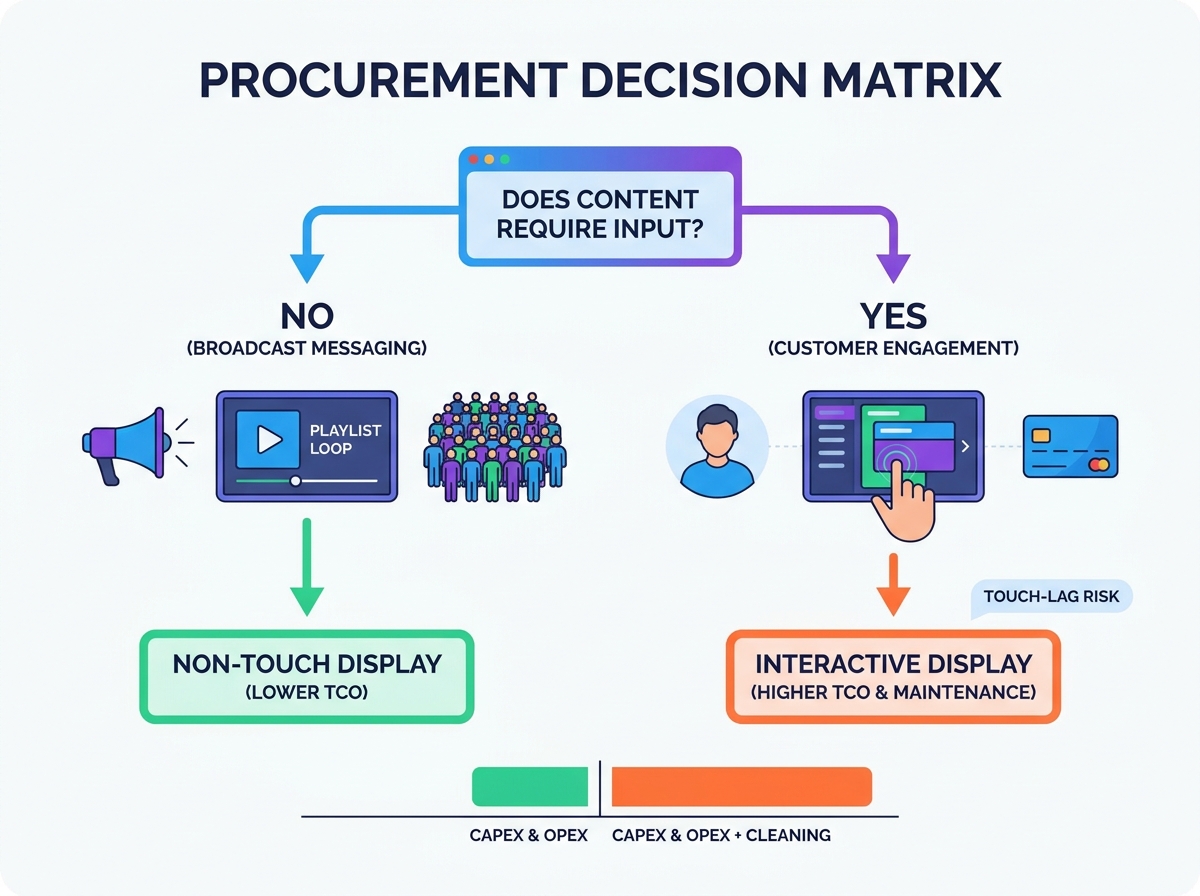
IT and procurement teams face a constant dilemma when modernizing physical spaces. You must balance the marketing demand for high customer engagement against strict budget constraints. Operational overhead also demands careful attention. We often see organizations default to interactive hardware without defining a clear use case first. This misalignment quickly leads to bloated budgets. It also results in underutilized hardware sitting idle in corporate lobbies or retail aisles. Simply put, buying the most advanced panel does not guarantee better business results.
Our objective is to provide an evidence-based matrix. We want to help you evaluate exactly when an interactive setup is strictly necessary. You will learn when a static digital monitor serves as the smarter, more scalable investment. By defining clear business objectives upfront, you avoid costly hardware mistakes. We will explore the financial impacts of different hardware choices. You will also discover the maintenance realities of each option. This guide empowers buyers to make confident, data-backed procurement choices.
Key Takeaways
- Form Follows Function: An indoor touch screen display is essential for a customer self service interface or complex wayfinding, but creates unnecessary friction for simple broadcast messaging.
- TCO Realities: Interactive hardware carries a 30–50% higher initial CapEx, supplemented by ongoing OpEx tied to CMS licensing and physical maintenance.
- Operational Strain: Factoring in the touch display cleaning workload and hygiene compliance is critical for long-term deployment viability.
- The Baseline Rule: If the user does not need to input data, navigate a multi-layered menu, or alter the on-screen outcome, default to non-touch.
Defining the Business Objective: Broadcast vs. Interaction
Framing the problem takes upfront communication between IT and marketing. You need to know what success looks like for the specific deployment zone. Stakeholders often skip this crucial step. They rush into evaluating hardware specifications instead. You must ask what the audience actually requires. Does the visitor need to browse an inventory catalog? Do they simply need directions to the nearest exit? Matching the technology to audience behavior ensures a successful rollout.
The Non-Touch Approach
This strategy excels in one-to-many communication. Passive consumption requires zero user effort. Menu boards require fast reading. Promotional loops demand attention without action. Corporate dashboards broadcast performance metrics widely. In these cases, interaction slows everything down. Deploying a robust non touch advertising monitor is highly preferable in heavy foot-traffic transit zones. Airports and train stations need constant movement. Lingering causes spatial bottlenecks. You want people to read the gate information and keep moving. Static screens push information efficiently. They do not invite users to stop and play, keeping concourses clear.
The Interactive Approach
Some environments demand one-to-one user journeys. Retailers rely on product customization. Shoppers love endless aisle browsing when items are out of stock. Car dealerships let buyers build their own vehicles directly on the screen. These applications require physical input to drive value. A secure customer self service interface also relies entirely on interaction. Fast food kiosks let users order privately and quickly. In these specific scenarios, passive broadcasting fails entirely. You need a responsive, engaging panel.
Financial Planning: CapEx and OpEx Breakdown
Budget evaluation goes far beyond the initial sticker price. Let us compare hardware CapEx and ongoing OpEx. You must understand the true financial commitment before issuing a purchase order.
Hardware CapEx
Commercial-grade standard panels cost significantly less. They represent an affordable baseline investment. If you choose an indoor touch screen display, expenses rise quickly. You pay extra for PCAP (Projected Capacitive) or IR (Infrared) sensors. PCAP offers a sleek, smartphone-like feel. IR uses bezel-mounted sensors to detect fingers. Both technologies increase upfront costs by 30 to 50 percent. You must also buy robust internal media players. Zero-latency responses require serious processing power. Cheap processors cause lag, ruining the investment.
- Standard Displays: Lower initial cost, simpler internal components.
- PCAP Displays: Premium pricing, edge-to-edge glass aesthetics.
- IR Displays: Mid-range pricing, thicker bezels, durable for public spaces.
Software & Licensing OpEx
Software costs recur annually. Static playlist platforms use lightweight licensing models. They cost very little to run. You just upload video files and schedule them. Interactive suites operate differently. They use complex API-driven software. They pull real-time inventory data from external servers. These platforms charge premium recurring fees. You pay for the advanced capability every single month.
Hidden Maintenance Overheads
Hardware requires physical care. You must analyze the ongoing touch display cleaning workload. Daily sanitization protocols demand specialized glass cleaners. Staff members spend hours wiping down screens. Fingerprints ruin the aesthetic quickly. Interactive units also suffer heavy physical wear. People poke and tap the glass repeatedly. You must factor in potential downtime. Budget for faster hardware replacement cycles compared to static monitors.
CapEx and OpEx Considerations
| Cost Category | Static Display | Interactive Display |
| Hardware CapEx | Baseline commercial pricing. | 30-50% premium for sensors. |
| Media Player Needs | Basic System on Chip (SoC). | High-performance CPU/GPU. |
| Software Licensing | Low-cost scheduling CMS. | Premium API-driven suites. |
| Maintenance Labor | Minimal dusting. | Daily sanitization required. |
![Indoor Touch Screen Display Setup]()
Evaluating Interactive Retail Screen Requirements and UX Realities
Meeting strict interactive retail screen requirements prevents poor user experiences. We must consider ergonomics, the physical environment, and processing limits carefully.
Ergonomics and ADA Compliance
Strict placement rules apply to physical panels. Mounting height and reach depth matter immensely. You must comply strictly. The Americans with Disabilities Act (ADA) outlines specific guidelines for kiosk installations. Regional equivalents exist globally. For example, wheelchair users must reach the top interactive corners easily. The maximum reach height usually sits around 48 inches from the floor. Every user deserves accessible technology. Failure to comply invites legal trouble. It also alienates a large segment of your customer base.
Environmental Suitability
Assess your lighting first. Protective touch glass suffers from heavy glare. Bright overhead lights wash out the image entirely. Matte-finish non-touch panels perform much better under bright lights. Also, consider hygiene perception carefully. Public space users remain hesitant post-pandemic. They actively avoid dirty screens. If your facility staff cannot clean the glass hourly, users will ignore the kiosk. A smudged screen damages your brand reputation.
Processing Power Limitations
Poor hardware causes severe touch-lag. Delay fundamentally destroys the user experience. Frustrated users walk away immediately. A sluggish interface renders the entire investment useless. You must prioritize fast processors for any interactive deployment. Do not skimp on RAM or CPU power. You need robust hardware to render 3D wayfinding maps or complex product carousels smoothly.
Implementation Risks, Security, and Hardware Compliance
Deploying hardware in unsupervised public areas introduces distinct risks. We must address data privacy, physical durability, and integration challenges before finalizing a choice.
Data Privacy & Security
Kiosks actively collect user inputs. This often includes Personally Identifiable Information (PII). Users might enter phone numbers, email addresses, or shipping details. Many retail kiosks process payment data directly. You must deploy strict kiosk lockdown software. OS hardening prevents malicious access to the desktop. Hackers target vulnerable public screens to install malware. You need enterprise-grade security protocols to protect consumer trust.
Durability and Vandalism
Public screens face daily abuse. Standard consumer monitors fail quickly here. You need strong IK (Impact Protection) ratings. IK10-rated glass withstands heavy blows from bags or shopping carts. High IP (Ingress Protection) ratings keep dust out. They also block liquid spills from ruining the electronics. Screens located in unsupervised public areas require maximum physical protection to ensure longevity.
Peripheral Lock-In
Integrations create immense complexity. Kiosks often connect to external hardware components. Receipt printers, barcode scanners, and RFID readers require specific software drivers. You risk severe vendor lock-in. Closed hardware ecosystems limit your future choices. Always verify peripheral compatibility before buying a closed kiosk shell. Demand open-architecture solutions whenever possible. This gives your IT team flexibility during future upgrades.
The Shortlisting Logic: A Procurement Decision Matrix
How do you finalize the hardware choice? We recommend a structured, step-by-step approach. Follow this matrix to guide your procurement strategy effectively.
- Step 1: The "Why" Check: Look at the intended content. Does it require physical input to deliver value? Can users consume the information passively? If they do not need to alter the outcome, default to non-touch.
- Step 2: The Budget Check: Review your operational budget realistically. Can it absorb a significant increase in software costs? Can you afford the extra maintenance labor? If funds are tight, default to non-touch.
- Step 3: The Environment Check: Evaluate your facility staff. Can they realistically maintain daily hygiene protocols? Can they handle frequent screen calibration? If you lack dedicated maintenance staff, default to non-touch.
- Step 4: Pilot Testing Strategy: Never roll out a fleet blindly. We recommend deploying a limited A/B test. Place one interactive unit in a key zone. Place one static unit nearby. Measure actual engagement metrics over thirty days. Review the data before finalizing a fleet-wide rollout.
Procurement Decision Matrix
| Evaluation Criteria | Lean Towards Non-Touch | Lean Towards Touch |
| Primary User Goal | Reading, viewing, waiting. | Searching, ordering, customizing. |
| Dwell Time Expectation | Under 15 seconds. | 1 to 5 minutes. |
| Maintenance Capacity | Low (weekly checks). | High (daily cleaning). |
| Network Environment | Offline or slow connection. | High-speed, low-latency connection. |
Conclusion
Let us summarize the core findings. Neither technology inherently beats the other. Your ROI relies entirely on use-case alignment. Align your hardware to actual user behaviors. Do not buy interactivity just for novelty. A well-placed static monitor often outperforms a poorly executed interactive kiosk.
We advise buyers to prioritize durable hardware always. Commercial-grade panels outperform consumer alternatives every time. Look for standard, multi-year warranties. Protect your investment regardless of the screen type you choose. You need reliable uptime to achieve your business goals. Always map your operational capacity to the hardware demands before signing a purchase order. Keep the user experience central to your strategy, and your deployment will succeed.
FAQ
Q: Can a non-touch display be upgraded to touch later?
A: Yes, you can use aftermarket IR touch overlays. These bezels attach to existing monitors. However, they carry significant risks. Calibration drops frequently. Dust accumulates inside the bezel edges. Buying native touch hardware provides a seamless, durable experience. Overlays work best as temporary solutions.
Q: What is the expected lifespan difference between touch and non-touch displays?
A: Non-touch displays typically last longer. They boast a higher Mean Time Between Failures (MTBF). Physical interaction introduces stress. Users press hard on the glass. Cleaning chemicals degrade screen coatings over time. You should expect interactive models to require replacement sooner than static monitors.
Q: Does touch screen software require a separate media player?
A: It depends on the complexity. Static content runs easily on internal System on Chip (SoC) processors. Heavy interactive rendering demands more power. Complex API integrations and 3D wayfinding require external PCs. A robust external media player ensures zero-latency performance for high-end deployments.