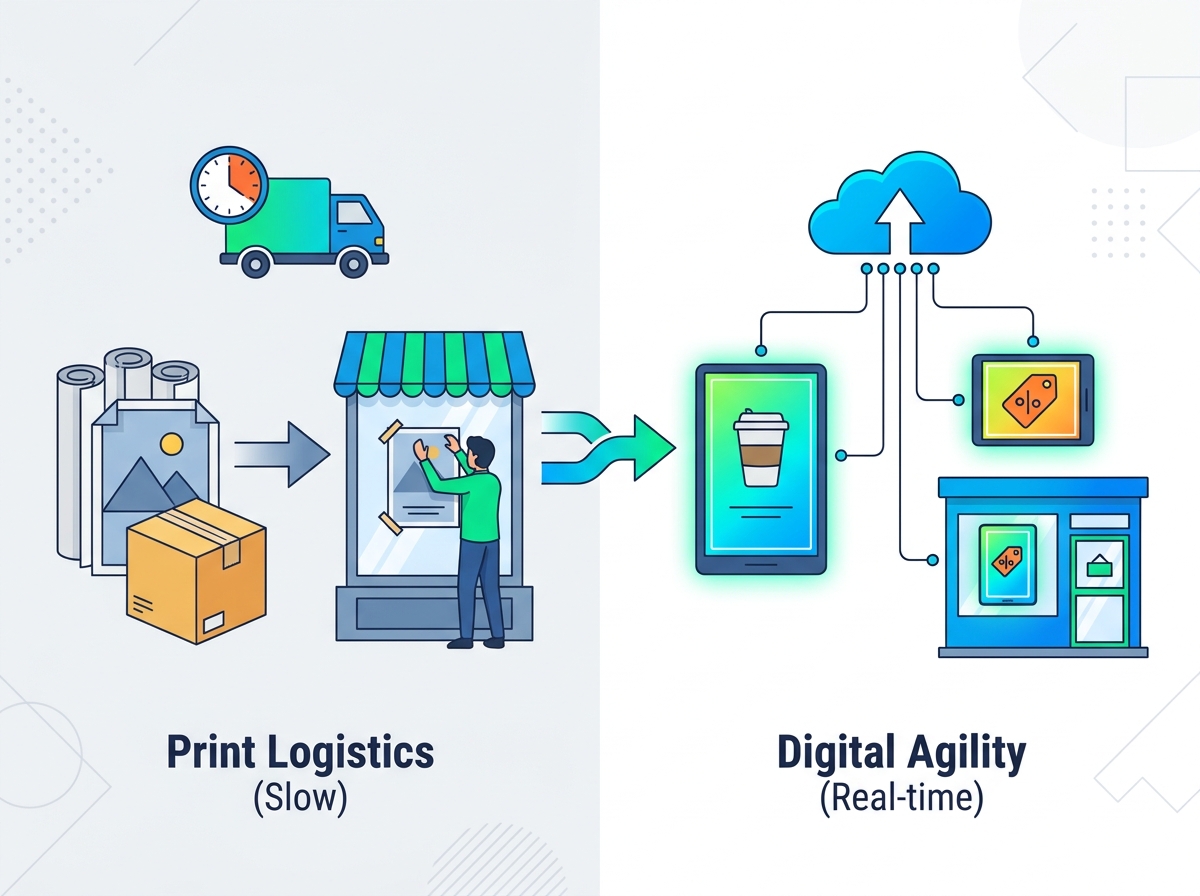
Retailers often struggle to keep physical storefronts as dynamic as their online presence. Static displays cannot match the speed of modern consumer expectations. Behind the scenes, the hidden costs of physical retail marketing pile up quickly. Printing delays, shipping logistics, and inconsistent manual installations across varying store locations create massive operational bottlenecks. You lose valuable time every time a new campaign rolls out.
Upgrading to digital storefronts solves these inefficiencies. This shift represents a structural operational upgrade, not just a visual enhancement. Going digital allows teams to react instantly to market trends, removing the friction of paper-based logistics. We have designed this pragmatic guide to help you successfully migrate from static print to dynamic screens.
You will learn the necessary steps to prepare campaign assets correctly. We also cover workflow governance and realistic implementation criteria for retail marketing teams. Mastering these elements ensures your digital transition remains profitable and visually compelling.
Key Takeaways
- Transitioning to digital requires adopting new resolution standards and aspect ratios to replace traditional physical dimensions without distorting campaign creatives.
- A centralized, permission-based Content Management System (CMS) is critical to mitigating the risks of localized brand non-compliance.
- Commercial-grade hardware requires specific baseline specs (e.g., 2500+ nits brightness, thermal management) to remain visible and functional in direct sunlight.
- Dayparting and contextual scheduling shift the storefront strategy from static single-message posters to dynamic, audience-specific campaigns.
Evaluating the Shift: Shop Window Poster Digitization vs. Traditional Print
Moving away from paper requires a frank assessment of your financial and operational models. The business case for shop window poster digitization relies on comparing initial hardware capital expenditures against the recurring monthly costs of traditional methods. Printing, shipping, and installing large-format paper posters drain budgets continually. Digital displays require a larger upfront investment. However, they eliminate those ongoing logistical fees, creating a clear break-even point for most retail networks.
Agility offers another massive advantage over traditional print. Paper campaigns force marketing teams into rigid three-to-four-week lead times. You must design, print, distribute, and manually hang every poster. Digital systems remove this waiting period entirely. Marketing teams can execute real-time reactive strategies. You can instantly push a localized inventory promotion to a specific store or trigger weather-based advertising when rain suddenly starts.
Environmental factors and municipal compliance also play critical roles. Eliminating physical waste aligns well with modern corporate sustainability goals. Yet, you must balance this waste reduction against increased energy consumption. Before installing dynamic digital displays, always consult local zoning laws. Some municipalities heavily regulate moving images or specific brightness levels in street-facing storefronts.
Finally, we must acknowledge realistic limitations. Do not underestimate installation complexities. Commercial displays require dedicated power routing, reinforced structural mounting, and reliable internet connectivity. Network dependency means you must plan for offline scenarios. Setting proper expectations early prevents budget overruns during deployment.
![Window Facing Digital Signage Display]()
Sizing and Formatting: Defining Storefront Campaign Asset Sizes
Successful storefront campaign asset sizes depend on translating physical dimensions into exact digital resolutions. You cannot simply upload a PDF designed for a 24x36 poster and expect it to look professional on a 4K display. Standard print formats like A0 or A1 must be mapped to 1080p or 4K UHD resolutions to maintain visual fidelity. When scaling up, low-resolution files will pixelate, instantly degrading your brand image.
Orientation constraints dictate your design approach. Most shop windows utilize a portrait (vertical) orientation to mimic traditional posters. Many brands make the mistake of repurposing horizontal television commercials or social media assets for these vertical displays. This shortcut often results in poor visual merchandising, awkward cropping, and unreadable text. You must build assets specifically for the intended screen orientation.
Technical asset specifications require strict enforcement. For static images, use high-resolution JPEG or PNG formats. Configure your DPI settings properly for large displays to avoid color banding in gradients. When working with motion graphics, MP4 and WebM formats work best. Keep frame rates at either 30fps or 60fps depending on the content pace. You should impose bitrate ceilings on video files to prevent the CMS from stuttering during playback.
Always apply the "Safe Zone" rule to your creatives. Street-level viewing angles vary drastically depending on where a pedestrian stands. Design your assets keeping clear central focal points. You must account for potential physical obstructions like window mullions, security bars, or structural bezels overlaying the edges of the display.
Print to Digital Conversion Reference
| Traditional Print Size | Standard Digital Resolution (Portrait) | Aspect Ratio | Recommended Format |
| A1 / 24" x 36" | 1080 x 1920 (FHD) | 9:16 | JPEG / MP4 |
| A0 / 33" x 46" | 2160 x 3840 (4K UHD) | 9:16 | JPEG / MP4 (High Bitrate) |
| Square Banners | 1080 x 1080 or 2160 x 2160 | 1:1 | PNG / WebM |
Establishing Your Retail Promotion Update Workflow
Replacing manual labor requires a robust retail promotion update workflow. First, you must define your governance model. Centralized control ensures the head office retains absolute brand consistency. Alternatively, localized control grants store managers restricted permissions to trigger specific promos, such as clearing local overstock. Most successful retailers use a hybrid approach. The head office dictates national campaigns, while local managers select pre-approved modular templates.
Approval gateways act as your primary quality control mechanism. Your CMS should feature a structured digital sign-off process. This prevents rogue or unapproved content from going live in storefronts. By setting tiered user permissions, regional directors can review local changes before hitting publish, ensuring full brand compliance.
You must establish failover protocols before deployment. Internet connections drop unexpectedly. When connectivity fails, your screens should never go black. Enterprise platforms support localized caching. The media player downloads and stores the active playlist locally. If the network drops, the default fallback loop continues playing seamlessly.
Deploying new network-wide strategies requires careful testing. We recommend following a structured rollout sequence:
- Lab Testing: Run the content loop on a single display at headquarters to verify bitrates, color accuracy, and safe zones.
- Flagship Pilot: Deploy the campaign to one or two high-visibility flagship stores. Monitor formatting success and hardware stability for one week.
- Regional Batching: Push the update to a specific region, allowing the support team to monitor network bandwidth loads.
- Global Rollout: Execute the network-wide push once all localized tests confirm stable playback.
Structuring a High-Impact Window Screen Content Calendar
A successful window screen content calendar respects the reality of pedestrian traffic. Street-facing audiences move quickly. You only have a few seconds to capture their attention. Match dwell time to content length by structuring short, high-impact loops. Assets should run for 5 to 10 seconds each. Avoid long, complex narratives. The message must be instantly digestible as someone walks past your store.
Dayparting strategies maximize the relevance of your messaging. Static posters display the exact same image all day. Digital screens let you schedule dynamic rules based on the time of day. A cafe might run aggressive coffee and pastry promotions during the morning commute. As evening approaches, the system can automatically pivot to higher-ticket items or ambient brand awareness content.
You must balance the playlist effectively. Pushing constant, aggressive sales messages causes visual fatigue and cheapens the brand. To avoid this, consider these balancing principles:
- Keep hard promotional conversions (discounts, sales) to roughly 30% of the total loop.
- Dedicate 50% of screen time to high-quality lifestyle imagery and brand-building content.
- Use the remaining 20% for ambient, contextual, or community-focused messaging to foster local goodwill.
Seasonal and reactive agility separates average retailers from market leaders. Pre-load your CMS with modular assets ready for specific conditions. You can link your calendar to live API triggers. If sudden rain hits the city, the screens instantly switch to umbrella and raincoat promotions. This automated responsiveness drives immediate foot traffic when consumer needs shift.
Shortlisting Hardware and CMS for Window Facing Digital Signage
Hardware selection dictates the success or failure of your entire project. Standard commercial televisions fail immediately in storefronts because they lack the "Sunlight Readable" mandate. Window facing digital signage requires a minimum brightness threshold of 2500 to 3000 nits. Anything less turns into a dark, unreadable mirror during afternoon sun exposure. Furthermore, you must specify isotropic panels. Standard LCD screens turn completely black when viewed through polarized sunglasses. Isotropic technology prevents this blackout effect, ensuring visibility for all pedestrians.
Thermal management is equally crucial. Storefront glass traps heat, creating a localized greenhouse effect. Screens baking in direct sunlight can reach internal temperatures exceeding 120°F (49°C). If you deploy hardware without military-grade thermal management, the 24/7 operational cycles will cause isotropic degradation. This results in permanent screen yellowing and dead pixels. Always verify the manufacturer's thermal dissipation specs and UV resistance ratings.
On the software side, prioritize CMS security and scalability. Retail networks process sensitive corporate data. Your chosen software must carry SOC2 compliance and enforce encrypted data transmission. Remote Device Management (RDM) capabilities are non-negotiable. RDM allows your IT team to reboot screens, update firmware, and troubleshoot playback errors remotely. You save thousands of dollars by avoiding physical tech truck rolls.
Finally, assess integration readiness. The true power of a digital storefront lies in automation. Ensure your chosen CMS can easily parse existing inventory APIs or retail data feeds. When an item sells out in the local point-of-sale system, the window screen should automatically remove the promotion. This data-driven approach guarantees you never advertise out-of-stock merchandise.
Conclusion
Moving from print to digital involves much more than hanging a screen. It demands a complete operational transformation. You must enforce strict asset formatting rules, ensuring every file matches specific resolutions and aspect ratios. Disciplined workflow governance protects your brand identity while allowing localized agility. By choosing industrial-grade hardware and secure CMS platforms, you protect your investment against environmental damage and network downtime.
Take a pragmatic next step before committing to a global rollout. Conduct a baseline audit of your current annual print spend to establish your true return on investment timeline. Launch a limited, one-to-two-store pilot program. This pilot allows your team to test hardware resilience in direct sunlight and refine the CMS workflow practically. Once the pilot proves successful, you can scale confidently across your entire retail footprint.
FAQ
Q: What is the minimum brightness required for window facing digital signage?
A: Direct sunlight windows require at least 2500 nits (ideally 3000+), whereas standard indoor screens are typically only 300-500 nits. Insufficient brightness causes the screen to look dark or reflect the street like a mirror, rendering your content invisible during daylight hours.
Q: Can we just reuse our existing print poster files on the digital screens?
A: No. Print files (often CMYK and high-DPI PDFs) must be reformatted into RGB digital formats (1080p/4K JPEGs or MP4s) optimized for exact screen dimensions and aspect ratios. Scaling physical print assets directly often leads to pixelation, incorrect colors, and poor readability.
Q: How do we manage updates across hundreds of store windows simultaneously?
A: Through a cloud-based digital signage CMS, which allows bulk updating, scheduling, and device monitoring from a single centralized dashboard. This bypasses local store manual labor, ensures immediate brand compliance, and allows headquarters to launch nationwide campaigns with a single click.
Q: What happens if a screen loses internet connection?
A: Enterprise-grade CMS platforms cache the active content locally on the media player, ensuring the screen continues to play its current loop seamlessly until the network is restored. Shoppers will not see error messages or blank screens during temporary outages.