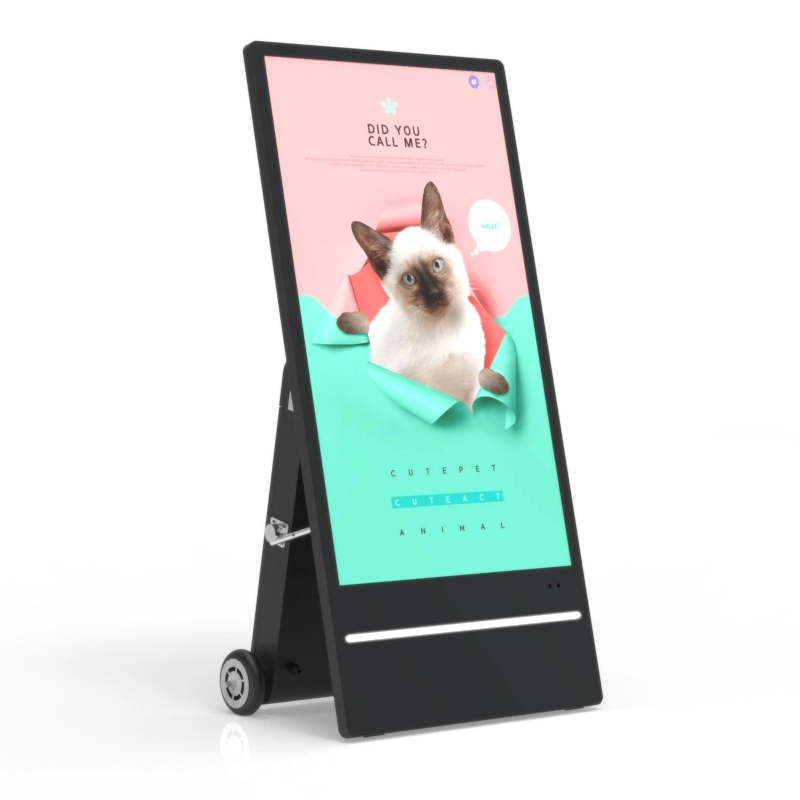
An outdoor display does much more than play a video on a weather-resistant screen. Outdoor Digital Signage combines content management software, a media player, an LCD panel, network connectivity, environmental protection, and carefully planned installation. Each part must work together for the message to remain visible, current, and stable throughout changing light and weather conditions.
Understanding that workflow helps buyers evaluate more than screen size or resolution. It also reveals why brightness, enclosure design, local playback, content scheduling, service access, and thermal control can determine whether Outdoor Digital Signage performs reliably after installation.

How Outdoor Digital Signage Moves Content From the CMS to the Screen
The process begins inside a content management system, commonly called a CMS. An authorized user uploads images, videos, menus, maps, announcements, or other media. The user then arranges the material into layouts and playlists, assigns it to one or more displays, and defines when it should appear.
Once published, the CMS sends the content package and playback instructions through the available network. Depending on the deployment, the connection may use Ethernet, Wi-Fi, or mobile data. The media player inside or connected to the display receives the files, stores them, decodes the media, and sends the correct image sequence to the LCD panel.
A typical Outdoor Digital Signage workflow includes four connected stages:
| System Stage | What Happens | Practical Consideration |
| Content preparation | Media is created and organized into layouts | Match the layout to screen orientation and resolution |
| CMS publishing | Playlists, schedules, and screen groups are assigned | Confirm the correct location and time zone |
| Player processing | Files are downloaded, stored, and decoded | Provide enough processing power and storage |
| LCD presentation | The screen renders the scheduled content | Adjust brightness and inspect readability on site |
A CMS outdoor digital signage model combines remote content control with a wall-mounted LCD enclosure. Its listed configuration includes 2K or 4K display options, automatic light-sensitive brightness adjustment, 2500-nit brightness, IP66 protection, and screen sizes from 32 to 65 inches.
Reliable systems should also retain playable content locally. If the network drops temporarily, the player can continue showing downloaded material instead of leaving a blank screen. The connection is still necessary for new uploads, schedule changes, status reporting, and cloud-based control, but continuous streaming should not be the only playback method for a critical installation.
How the Outdoor LCD Hardware Keeps Content Visible
Outdoor Digital Signage must compete with daylight, reflections, viewing distance, and rapidly changing ambient light. A standard indoor screen may display clear images inside a building but appear washed out when exposed to direct sun. Outdoor LCD equipment addresses this problem through higher brightness, reflection control, suitable contrast, and automatic adjustment.
Brightness is measured in nits. The correct level depends on whether the display is installed under a canopy, in partial shade, beside a bright storefront, or in direct sunlight for much of the day. More brightness is not automatically better at every hour. A screen that remains at maximum output after dark may cause glare, consume unnecessary power, and create an uncomfortable viewing experience.
Automatic light-sensitive control allows the system to increase output during bright conditions and reduce it as ambient light falls. This helps Outdoor Digital Signage remain readable across the day without requiring repeated manual changes. Anti-glare glass can further reduce disruptive reflections, although content still needs strong contrast and uncluttered layouts.
Resolution affects detail rather than sunlight visibility. Full HD may be adequate for large text and simple advertising viewed from a distance. A 4K panel becomes more useful for large screens, close viewing, detailed maps, product images, or interactive interfaces. Buyers should therefore evaluate brightness and resolution separately rather than treating a higher pixel count as proof of outdoor readability.
The available outdoor LCD products illustrate this distinction. One interactive totem is offered in sizes from 43 to 98 inches with 2500–3000-nit brightness and Full HD or 4K options. Another floor-standing unit lists 2000–3000-nit sunlight-readable configurations, a 178-degree viewing angle, anti-glare tempered glass, and Full HD or 4K resolution.
Content design remains part of the visibility system. Large type, short messages, high color contrast, and sufficient spacing are usually more effective outdoors than dense paragraphs or complex animation. The display can provide strong output, but it cannot correct a layout that requires viewers to stop and study the screen.

Why Weather Protection Requires More Than a Sealed Cabinet
The enclosure separates sensitive electronics from rain, dust, debris, and accidental contact. Outdoor Digital Signage commonly uses an ingress-protection rating to describe resistance to solids and water. The first digit addresses solid-particle protection, while the second addresses water exposure under defined test conditions.
An IP rating should not be interpreted as permission to ignore installation conditions. Water can still enter through incorrectly fitted cable openings, damaged door seals, loose service panels, or poorly designed mounting points. A display installed where water pools around its base also faces a different risk from one mounted on a properly drained foundation.
Heat management is equally important. Direct sunlight warms the LCD surface and enclosure, while the player, power supply, and other internal components generate additional heat. A cabinet therefore needs a thermal strategy that removes heat without compromising environmental protection. Depending on the design, that strategy may involve controlled airflow, fans, heat exchangers, sensors, or automatic operating limits.
Condensation is another risk. Moisture may form inside an enclosure when warm, humid air meets a colder surface. Sealing the cabinet without considering pressure changes, airflow, and internal temperature can trap moisture rather than prevent it. Site planning should account for local temperature swings, humidity, direct sun exposure, and seasonal weather instead of relying only on the rating printed in a specification sheet.
Installation completes the protection system. Mounting hardware must support the display’s weight and wind exposure. Power and network cables need outdoor-rated routing and protected entry points. Technicians also require safe access for filter cleaning, seal inspection, component replacement, and electrical testing. A weather-resistant screen placed on an unstable structure or connected through exposed cabling is not a reliable Outdoor Digital Signage installation.
How Interactive Outdoor Digital Signage Responds to Users
A non-touch display follows a scheduled playlist. An interactive system adds a touch sensor, operating system, and application that respond to user input. When a person touches the surface, the sensor detects the position and sends coordinates to the system. The application interprets the gesture and opens the requested page, map, product category, form, or media file.
This workflow allows Outdoor Digital Signage to support wayfinding, public information, searchable directories, product exploration, ticket guidance, and other self-service functions. The screen is no longer limited to presenting a predetermined sequence; users can navigate according to their immediate needs.
The interactive outdoor signage model supports Android or Windows configurations, screen sizes from 43 to 98 inches, high-brightness LCD output, and resolution options up to 4K. The waterproof totem also offers capacitive or infrared multi-touch options, depending on the required configuration.
Touch performance should be evaluated in the real installation environment. Large touch targets reduce selection errors, while simplified navigation helps users complete tasks quickly. The interface should return to its starting page after inactivity so one visitor’s session does not remain visible to the next person.
Outdoor conditions also affect interaction. Rain on the glass, gloves, dirt, strong reflections, and extreme surface temperatures may change the user experience depending on the touch technology. Testing should reproduce the expected conditions rather than relying only on an indoor demonstration.
Security becomes more important when users can control the interface. The system should restrict access to approved applications, hide operating-system controls, reset sessions, protect personal information, and prevent unauthorized changes. Interactive Outdoor Digital Signage should also provide a clear offline response when live data or a remote service is temporarily unavailable.

How to Keep Outdoor Digital Signage Reliable After Installation
Successful operation depends on what happens after the display is mounted. Outdoor Digital Signage is an ongoing communication system, so content ownership, connectivity, monitoring, cleaning, and maintenance responsibilities should be defined before launch.
Content teams need a publishing process that prevents outdated or incorrect messages. Approval rules are particularly useful when several departments contribute material. Scheduling can then change campaigns by time of day, location, event, or operating hours without requiring someone to visit every screen.
Network planning should include more than checking whether a wireless signal exists. A connection that works beside the router may become unstable inside a metal enclosure or during periods of heavy local traffic. Test the network at the final mounting position and confirm how the player behaves during an outage. Critical content should remain available locally, while failed downloads should generate a visible status alert for administrators.
Routine inspection helps identify small problems before they affect playback. A practical maintenance plan covers:
Cleaning the LCD surface without damaging its coating.
Inspecting door seals, cable entries, mounting points, and drainage.
Confirming fans, sensors, and temperature controls operate normally.
Updating approved software and checking playback logs.
Testing touch response, network recovery, and scheduled content changes.
Commissioning should take place under realistic conditions. Inspect the screen near the brightest part of the day, view it from the intended distance and approach angle, and verify that text can be understood quickly. Disconnect the network briefly to test fallback behavior. For touch projects, ask users of different heights to navigate the interface and confirm that important controls remain reachable.
Outdoor Digital Signage selection should therefore begin with the site and application rather than a preferred screen size. Record the sun path, expected viewing distance, mounting method, available power, network options, environmental exposure, content type, interaction requirements, and maintenance access. These factors determine which brightness range, protection level, orientation, operating system, and control method are appropriate.
A technically advanced display can still underperform when it is difficult to update, poorly positioned, or expensive to service. A balanced system makes content easy to manage, keeps playback stable during routine disruptions, protects the hardware, and gives maintenance teams practical access throughout the installation’s working life.
Conclusion
Outdoor Digital Signage works by connecting content creation, CMS scheduling, media playback, high-brightness LCD presentation, environmental protection, and ongoing maintenance. Buyers should assess the complete workflow rather than selecting a display from resolution or size alone.
Shenzhen Dinosaur Display Co., Ltd. is a manufacturer with documented factory, production, testing, and product-development capabilities. Its outdoor LCD range includes remotely managed, waterproof, wall-mounted, floor-standing, and touch-enabled configurations, allowing projects to match hardware and control methods to real site conditions.
FAQ
Q: Does Outdoor Digital Signage require a constant internet connection?
A: Not necessarily. Locally stored content can continue playing offline, but internet access is normally required for remote updates, schedule changes, monitoring, and new downloads.
Q: Is 4K resolution always necessary for an outdoor display?
A: No. Full HD can suit distant viewing and simple messages. 4K is more useful for large screens, detailed graphics, close viewing, and interactive interfaces.
Q: What is the difference between IP65 and IP66 signage?
A: Both provide strong dust protection. IP66 is tested against more powerful water jets, but correct installation, cable sealing, drainage, and maintenance remain necessary.
Q: How does touch functionality work on outdoor signage?
A: A touch sensor sends the selected coordinates to an Android or Windows application, which responds by opening information, maps, directories, forms, or other interactive content.
Q: What causes Outdoor Digital Signage to become difficult to read?
A: Common causes include insufficient brightness, reflections, small text, weak contrast, excessive information, poor viewing angles, and content designed without considering distance or daylight.